Master IT Project Management Process with Easy Examples
- What is IT Project Management?
- What is the Importance of IT Project Management?
- What Are The Key Phases of IT Project Management?
- Responsibilities of an IT Project Manager
- How to Manage an IT Project in 7 Actionable Steps
- Common IT Project Management Methodologies
- Tools and Techniques Used in IT Project Management
- IT Project Management Best Practices
- 3 Challenges in IT Project Management
- Boost Your IT Project Management with the Best Software
- FAQs about IT Project Management
Key Highlights:
- IT project management brings structure to planning, execution and delivery of complex technology initiatives.
- Effective IT project planning reduces delays, controls budgets and keeps teams aligned.
- Clear phases help IT project management move smoothly from initiation to closure.
IT project management often feels frustrating when deadlines slip, budgets grow and teams stay busy without real progress. You may have talented people, but without clear structure, work gets misaligned, priorities shift and stakeholders end up disappointed.
These issues usually come from missing the core practices that make IT project management effective. Lack of clear communication and ownership during planning can make even simple projects chaotic.
This guide breaks down IT project management in a clear, practical way—from planning and execution to delivery. You’ll learn proven frameworks, real-world techniques and simple methods to keep projects on track, control costs while supporting your team without burning them out.
What is IT Project Management?
IT project management is the practice of planning and delivering technology initiatives from start to finish. It involves coordinating teams and resources to build software systems or implement tech solutions. The goal is to complete projects on time while meeting specific business requirements and staying within budget.
IT project management directly shapes how satisfied clients feel with the final product. When projects are well-managed, clients receive solutions that actually solve their problems and arrive when promised.
Key objectives:
- Scope management: Define exactly what the project will deliver and prevent unnecessary additions that cause delays.
- Timeline adherence: Complete each phase of work according to the agreed schedule so stakeholders can plan accordingly.
- Budget control: Track spending carefully to ensure the project doesn’t exceed its allocated financial resources.
- Quality assurance: Deliver technology that works reliably and meets the technical standards expected by users.
- Risk mitigation: Identify potential problems early and create backup plans before issues can derail progress.
What is the Importance of IT Project Management?
IT project management is essential for organizations that want their technology investments to succeed. Let’s look at what the data tells us about why this matters.
Better Resource Allocation
IT project management helps teams focus on the right work at the right time, so effort isn’t wasted. Smart strategic planning reduces idle time, prevents overload, and minimizes constant task switching that slows progress.
Improved Communication
A clear structure makes stakeholder management easier by defining who shares updates, who approves decisions and when communication happens. This keeps everyone aligned and reduces last-minute confusion.
Risk Reduction
Project managers spot risks early, whether they affect timelines, budgets, or information security. Catching issues upfront gives you time to adapt instead of reacting when problems escalate.
Clear Accountability
Clear role definitions help teams understand exactly what they own within the IT infrastructure. Decisions move faster because responsibility is clear, not debated.
Measurable Progress
Using structured tracking within an agile framework makes progress visible at every stage. You can see what’s done, what’s blocked and what needs attention next.
Higher ROI
Well-managed projects support real digital transformation, not half-built solutions. The result is reliable information systems that deliver value long after launch.
What Are The Key Phases of IT Project Management?
Every IT project follows a lifecycle that guides it from initial idea to final delivery. Understanding these five phases helps teams stay organized and ensures nothing critical gets overlooked.

Phase 1: Initiation
This is where the project idea takes shape and gets a reality check. You define the problem, confirm alignment with the overall business strategy and decide if the project is worth the time as well as investment. Simply put, this phase answers the “should we do this?” question.
Key activities usually include:
- Identifying stakeholders who will influence decisions or be impacted
- Building a clear business case that explains the value
- Setting early budget and timeline expectations
Teams also document high-level requirements and constraints. A project charter is created to formally approve the work and give the project manager the authority to move forward. This became the project’s north star later on.
Phase 2: Planning
Planning turns approval into a practical game plan. This is where you figure out how the work will actually get done and who’s responsible for what. Strong planning reduces surprises during execution.
At this stage, teams focus on:
- Defining deliverables and success criteria
- Assigning work across cross-functional teams
- Mapping task dependencies using tools like the Critical path method
You’ll also build detailed schedules, communication plans and risk strategies. Quality standards and escalation paths are set so everyone knows how decisions will be made once work begins.
Phase 3: Execution
Execution is where ideas turn into real outputs. Teams start building, configuring, or implementing solutions, making this the most time-intensive phase. The project manager keeps things moving and clears roadblocks as they appear.
Typical execution activities include:
- Coordinating daily work and tracking progress
- Supporting collaboration between technical and non-technical roles
- Working closely with roles like the Scrum master to maintain momentum
Regular check-ins help surface issues early, while emerging technologies like artificial intelligence may be leveraged to speed up delivery or improve accuracy.
Phase 4: Monitoring and Controlling
Monitoring and controlling phase runs alongside execution as well as focuses on staying on track. You continuously compare actual progress against the plan and make adjustments when needed.
Project managers regularly review:
- Schedule and budget performance
- Quality of deliverables
- New or evolving risks
Change requests are evaluated carefully to avoid scope creep. If things drift, corrective actions are taken to realign the project with its original goals.
Phase 5: Closure
Closure ensures the project finishes cleanly as well as delivers lasting value. Deliverables are handed over, documentation is finalized and the team reflects on lessons learned.
Wrap-up activities usually include:
- Formal stakeholder sign-off
- Releasing or reassigning team members
- Archiving documents for future reference
Retrospectives help teams improve future projects, while recognizing successes boosts morale and reinforces good practices.
Responsibilities of an IT Project Manager
IT project managers wear many hats throughout a project’s lifecycle. Their role goes beyond simply tracking tasks—they ensure the team delivers results.

- Creating and maintaining the project schedule: Project managers build timelines that actually reflect how work gets done, not just how it looks on paper. They track task dependencies, update plans when delays happen and often use tools like Microsoft Excel to keep schedules clear as well as easy to follow.
- Facilitating problem-solving and decision-making: When challenges come up, project managers bring people together and keep conversations focused. Effective team meetings help teams resolve disagreements, evaluate options, and make decisions faster instead of getting stuck in back-and-forth debates.
- Ensuring quality standards are met: The manager defines what “done” really means and checks that work meets those expectations. Their training, often backed by a PMP certification, helps them set up review and testing processes that catch issues early, when fixes are easier as well as cheaper.
- Managing stakeholder expectations: Clear leadership balances ambition with reality by setting honest commitments and explaining trade-offs clearly. This approach supports a collaborative culture, where trust grows because stakeholders know they’re getting transparency, not overpromises.
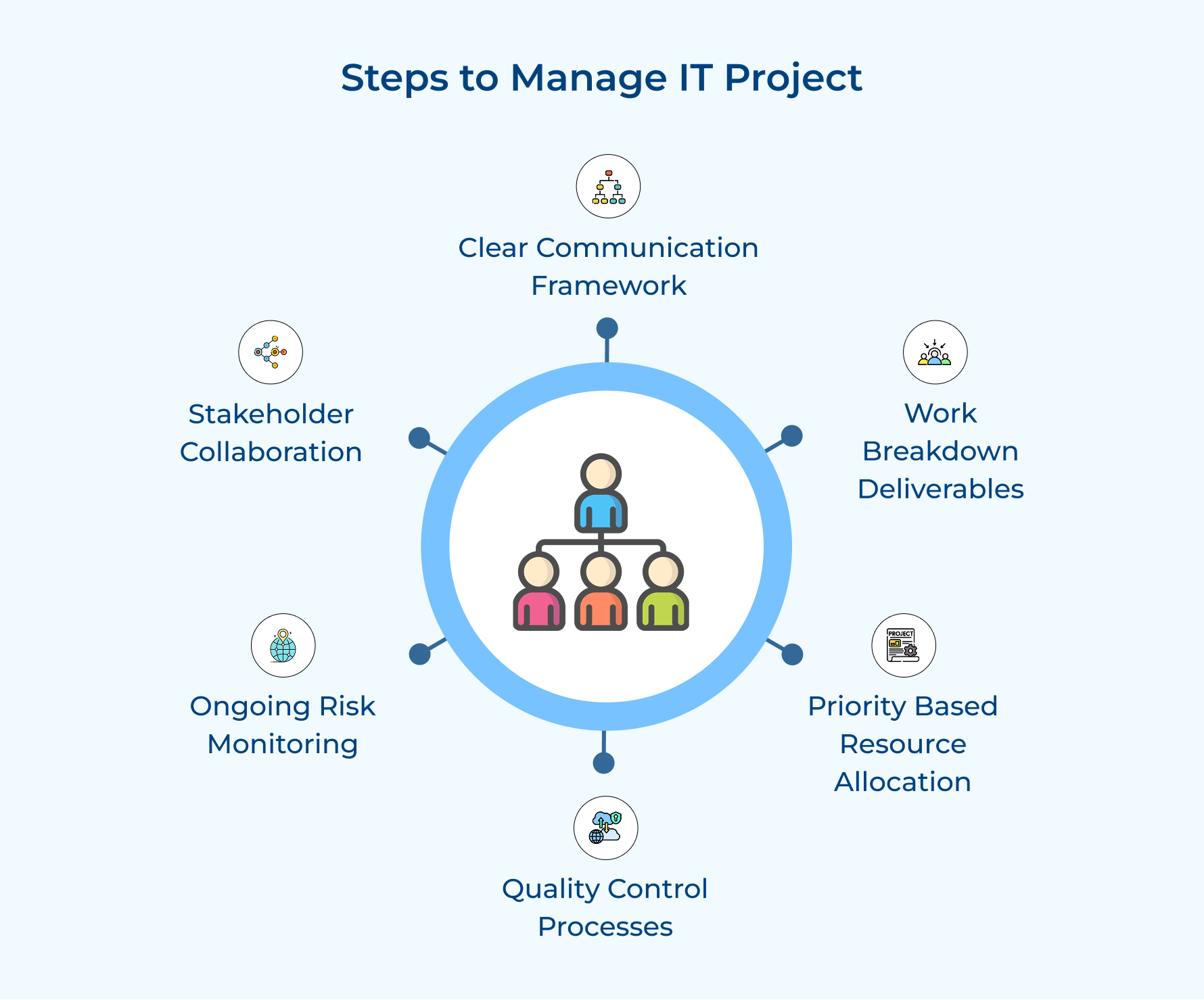
How to Manage an IT Project in 7 Actionable Steps
Let’s explore this process and discover how it can transform your project management approach, ensuring not just completion, but success.
1. Establish Clear Communication Framework
A communication framework creates structured pathways for information to flow between team members and stakeholders throughout your project. It matters because miscommunication causes more project failures than technical problems ever do.
Before setting up your communication structure, ask these four questions:
- Who needs to receive project updates and how frequently should they get them?
- Which communication channels will the team use for different types of information?
- What information requires immediate attention versus what can wait for scheduled updates?
- How will remote and on-site team members stay equally informed about project developments?
These questions help you understand your communication needs before building the actual framework. The framework should feel natural rather than adding bureaucratic overhead that slows everyone down.
Here are communication elements every IT project should include:
- Weekly status meetings where team leads share progress and surface blocking issues
- Shared project dashboard that displays real-time metrics anyone can check anytime
- Daily standup meetings for development teams to coordinate their immediate work
- Monthly stakeholder reviews that demonstrate tangible progress through working demos
2. Break Down Work into Deliverables
Breaking down work means dividing your entire project into specific outputs that teams can build independently. This step is critical because smaller deliverables let you track progress accurately and give the team accomplishment as they complete each component.
Here are three proven approaches to breaking down your project effectively:
- Start with user-facing features: Identify what end users will actually interact with and structure deliverables around those touchpoints. This keeps the team focused on creating value rather than getting lost in technical details.
- Map technical dependencies first: Understand which components must be built before others can start. This prevents your team from discovering halfway through that they’re blocked waiting for infrastructure that should have been ready.
- Apply the two-week rule: Size each deliverable so a small team can reasonably complete it within two weeks. Anything larger needs further breakdown because it’s too big to estimate or track effectively.
Consider a mobile banking app project where you need account management and transaction features. Instead of tackling “build the entire app,” you break it into specific deliverables like user authentication and account balance display. Each piece can be developed independently, which means your QA team can validate the login system while developers work on transaction features.
3. Allocate Resources Based on Priorities
Resource allocation means assigning the right people and tools to the most important tasks at the right time. Poor allocation leaves high-priority work understaffed while lower-priority tasks consume resources that should be deployed elsewhere.
Consider these four criteria when prioritizing your resource allocation decisions:
- Business impact: Evaluate which deliverables directly affect revenue generation or customer satisfaction most significantly.
- Dependency chains: Recognize which tasks block multiple other activities from starting or completing successfully.
- Resource availability: Account for when specific skilled team members or required tools become available for assignment.
These criteria prevent you from allocating resources based on gut feeling or whoever asks loudest. Teams waste less time on work that seemed urgent but wasn’t truly important to the final outcome.
4. Implement Quality Control Processes
Quality control processes are systematic checks that verify your deliverables meet required standards before they reach end users. This step is essential because catching defects early costs far less than fixing problems after deployment when customers are already affected.
Quality control gets implemented by embedding checkpoints throughout your development workflow rather than saving all testing for the end. Your team conducts reviews at multiple stages so problems get identified when they’re still easy to fix.
Pro tips:
- Require deliverables to pass specific criteria before moving from development to testing or from testing to production deployment.
- Have at least two experienced developers examine security-related components or complex algorithms before they get merged into the main codebase.
5. Monitor Risks Throughout Project Lifecycle
Risk monitoring means continuously identifying potential problems and tracking existing threats that could derail your IT project. This step is essential because technology projects face countless variables that can shift unexpectedly throughout development.
Maintain Active Risk Register with Mitigation Strategies
Your risk register is a living document that catalogs every identified threat along with its likelihood and potential impact. The register gets updated weekly as your team discovers new risks and as existing risks either materialize or become less relevant based on project progress.
Conduct Regular Risk Assessment Sessions with Team
Risk assessment sessions bring your entire team together to discuss what could go wrong in upcoming work. Team members closest to the technical work often spot risks that project managers sitting in meetings all day would never see coming.
Adjust Plans When New Threats Emerge
Plan adjustment means changing your approach when risk monitoring reveals that your original strategy won’t work anymore. Rather than stubbornly sticking to the original plan, you pivot your resource allocation or modify deliverable timelines to address the new reality.
6. Facilitate Stakeholder Collaboration
Facilitating stakeholder collaboration means creating opportunities for business leaders and technical teams to work together throughout the project. If you skip this step, your team builds exactly what the requirements document said but delivers something that doesn’t solve the actual business problem.
Here are proven methods to keep stakeholders actively engaged:
- Schedule biweekly demos showing working features: Let stakeholders interact with actual software rather than reviewing slides that describe what might eventually exist.
- Create feedback channels for immediate input: Establish communication paths where stakeholders can raise concerns as they think of them instead of waiting weeks for scheduled meetings.
- Invite key stakeholders to sprint planning sessions: Give business leaders visibility into what the team will build next so they can redirect efforts before developers invest time.
- Establish a stakeholder advisory board for major decisions: Form a small group who can make binding decisions without requiring approval from every single person with an opinion.
So what should these collaboration sessions actually focus on beyond just showing demos? They want to know if you’re solving the right problems and whether the solution will actually work for real users. The agenda should center on validating that features being built address genuine business needs and gathering input on upcoming work before your team commits resources to it.
These collaboration touchpoints also need to accomplish two critical things:
- Resolve conflicting requirements when different stakeholders want incompatible features that can’t coexist in the final product
- Build stakeholder buy-in for difficult tradeoffs when budget or timeline constraints force the team to cut scope
Common IT Project Management Methodologies
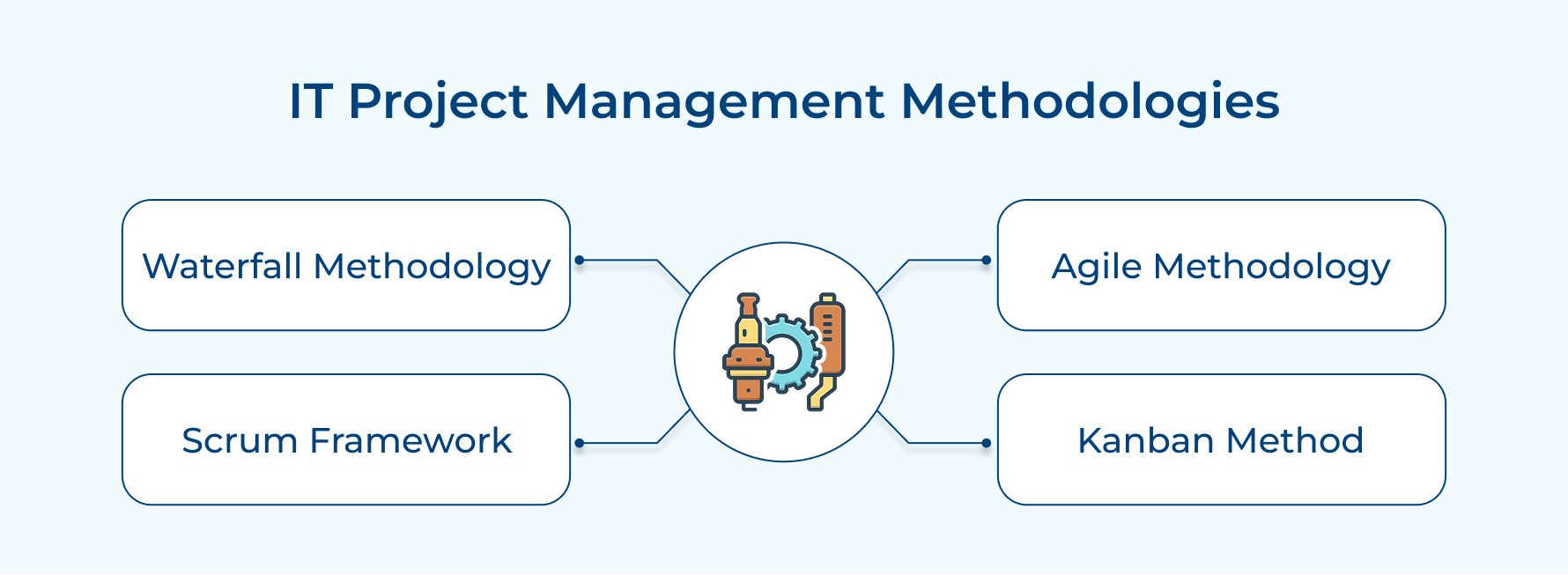
Different projects need different approaches to succeed. The methodology you choose shapes how your team works and how clients experience the development process.
1. Waterfall Methodology
Waterfall takes a step-by-step approach where one phase must be fully completed before the next begins. It works best when requirements are clearly defined upfront and unlikely to change, making it easier to plan timelines as well as budgets early.
2. Agile Methodology
Agile focuses on flexibility and speed by breaking work into short cycles called sprints. Teams deliver small, usable pieces of software regularly, so clients see progress quickly and can guide changes as the project evolves.
3. Scrum Framework
Scrum adds structure to Agile by organizing work into fixed-length sprints, usually two to four weeks. Daily standups keep everyone aligned, while sprint reviews give clients a clear view of progress and a chance to adjust priorities.
4. Kanban Method
Kanban keeps work visible by mapping tasks on a board as they move from start to finish. By limiting how much work is in progress at once, teams avoid overload and keep work flowing smoothly.
Tools and Techniques Used in IT Project Management
Modern IT project management relies on specific tools and techniques that help teams stay organized. These resources transform abstract plans into concrete actions while keeping everyone aligned.

1. Project Management Software
Project management software brings everything into one place, making it easier for teams to plan work and track progress from start to finish. By combining scheduling, resource management and reporting, these tools give project managers a clear, real-time view of what’s happening across the project.
Key features:
- Integrated dashboards that display project health metrics and progress indicators in one view.
- Automated dependency tracking that alerts teams when upstream delays will affect downstream tasks.
2. Work Management Platforms
Work management platforms help teams organize day-to-day tasks and assign clear ownership to each person. They make it easier to break big projects into manageable actions that team members can pick up and complete without confusion.
Key features:
- Task prioritization systems that help team members focus on what matters most each day.
- Progress visualization through boards that show work moving from to-do through completion.
3. Gantt Charts
Gantt charts lay out your project on a visual timeline, showing each task as a bar that stretches across its scheduled dates. At a glance, you can see what’s happening in parallel and which tasks depend on others finishing first.
Key features:
- Critical path highlighting that identifies which task delays will push back the entire project.
- Milestone markers that show key decision points and major deliverable due dates on the timeline.
IT Project Management Best Practices
Following proven best practices separates successful IT projects from those that struggle or fail. These guidelines represent lessons learned from thousands of projects across different industries and technology stacks.
- Define clear success criteria upfront: Establish measurable goals that everyone agrees define project success before any development work begins. Explicit criteria align stakeholder expectations and prevent debates at delivery time.
- Maintain realistic timelines and buffers: Build schedules based on actual team capacity rather than wishful thinking about how fast work should go. Include buffer time for unexpected problems because every project encounters surprises.
- Prioritize features based on business value: Focus development effort on capabilities that deliver the highest return rather than building everything stakeholders request. It ensures limited resources get spent where they matter most.
- Document decisions and requirements changes: Record why important choices were made and track how requirements evolved over time in writing. This documentation prevents confusion when team members forget earlier discussions or new people join mid-project.
- Conduct regular retrospectives for continuous improvement: Hold team meetings after major milestones to discuss what worked well and what needs improvement for future work. These honest conversations help teams learn from experience rather than repeating the same mistakes.
3 Challenges in IT Project Management
IT project management comes with unique obstacles that can derail even well-planned initiatives. Understanding these common challenges helps you anticipate problems and prepare strategies to overcome them.

1. Scope Creep and Changing Requirements
Scope creep happens when stakeholders continuously add new features or modify existing requirements after the project has started. Each small addition seems reasonable in isolation, but collectively they push timelines back and consume the budget allocated for original deliverables.
2. Resource Constraints and Team Availability
Resource constraints emerge when your project needs specific technical skills but those experts are already committed to other initiatives. Team members get pulled in multiple directions as competing priorities demand their attention, which means your project gets only partial focus.
3. Technical Complexity and Integration Issues
Technical complexity arises when systems must connect with legacy infrastructure that wasn’t designed for modern integration approaches. What seemed straightforward during planning becomes a maze of technical challenges once developers actually start building and connecting the pieces.
The following solutions address the root causes rather than just treating symptoms.
- Implement a formal change control process that requires stakeholders to justify new requests and accept timeline impacts before approval
- Cross-train team members on multiple technologies so knowledge doesn’t create single points of failure when people become unavailable
- Conduct technical proof-of-concept work early to identify integration challenges before committing to full development of complex features
- Hold regular alignment sessions where technical and business teams review progress together using demos rather than status reports
Boost Your IT Project Management with the Best Software
Successful IT project management depends on having the right tools that keep your team coordinated and your stakeholders informed. The software you choose should simplify complex workflows rather than add unnecessary overhead that slows your team down.
Kooper brings project management capabilities together with financial tracking and team collaboration features in one integrated platform. This unified approach means your IT projects stay on budget while maintaining clear visibility into progress without switching between multiple disconnected tools.
Limit time — not creativity
Everything you need for customer support, marketing & sales.

Neeti Singh is a passionate content writer at Kooper, where he transforms complex concepts into clear, engaging and actionable content. With a keen eye for detail and a love for technology, Tushar Joshi crafts blog posts, guides and articles that help readers navigate the fast-evolving world of software solutions.