What Is Digital Project Management? Steps, Tools & Benefits
- What is Digital Project Management?
- Key Benefits of Digital Project Management
- How To Manage Digital Projects in 7 Actionable Steps
- What Does a Digital Project Manager Do?
- Skills Needed for Digital Project Management
- Tips for Digital Project Management
- Best Digital Project Management Tools
- Streamline Digital Project Success With the Right Management
- FAQs about Digital Project Management
Key Highlights:
- Practical framework explaining what digital project management is and how teams manage digital projects without delays or scope creep.
- Step-by-step guidance on roles, skills and processes every digital project manager needs for consistent project success.
- Actionable tips and tools simplify collaboration, improve timelines all while keeping budgets under control.
Managing digital projects feels overwhelming when team members work remotely and clients expect constant updates on progress. Deadlines slip because tasks fall through communication gaps while budgets balloon from poorly defined scopes and endless revision cycles.
This guide to digital project management walks you through proven strategies for managing digital projects. You’ll learn how to build effective teams and create detailed plans that keep everyone aligned on goals as well as timelines throughout development.
These practical frameworks help you deliver projects on schedule, whether you’re managing your first website build or looking to improve how your agency handles client work. Let’s explore the essential skills and steps that transform chaotic projects into smooth collaborative experiences.
What is Digital Project Management?
Digital project management is the practice of planning and executing technology-based projects using online tools. It involves coordinating teams who work on websites, apps, software, or digital marketing campaigns. This approach differs from traditional management because it handles virtual deliverables and often manages remote teams across different locations.
Digital projects include developing a mobile banking app, launching an e-commerce website, creating a social media marketing campaign, or building a customer relationship management system. Project management ensures these initiatives stay on schedule and within budget. It also helps teams communicate effectively as well as deliver products that meet user needs.
Key objectives:
- Scope definition: Clearly outline what the project will deliver and what falls outside its boundaries.
- Timeline management: Create realistic schedules and ensure milestones are met without unnecessary delays.
- Resource allocation: Assign the right team members and tools to tasks based on skills as well as availability.
- Risk mitigation: Identify potential problems early and develop backup plans before issues disrupt progress.
- Quality assurance: Maintain standards throughout development to ensure the final product works as intended.
Key Benefits of Digital Project Management
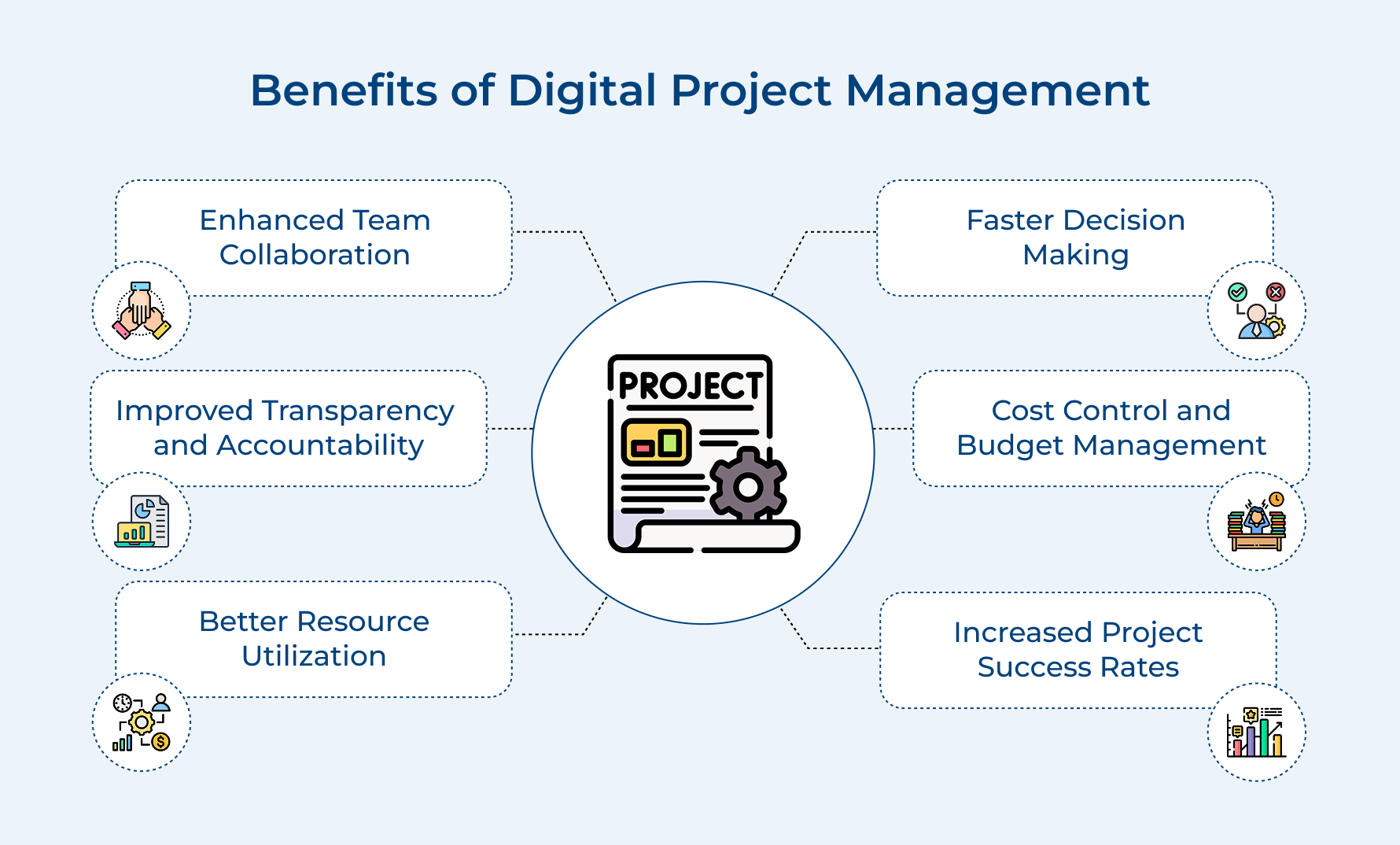
Digital project management transforms how teams work together and deliver results. Let’s explore six concrete advantages that make this approach valuable for modern organizations.
Enhanced Team Collaboration
In the current digital industry, teams don’t need to sit in the same room to work well together. Digital tools keep conversations flowing, updates instant and everyone aware of what’s changing as well as why. This makes collaboration feel natural, even across time zones.
Improved Transparency and Accountability
When work is clearly tracked, there’s no second-guessing around task assignments. Everyone can see what they own, what’s coming next and how their work connects to the bigger picture. That clarity reduces follow-ups and keeps accountability simple.
Better Resource Utilization
A reliable task management tool shows who’s stretched thin and who has room to help. This makes it easier to rebalance workloads early, avoid burnout and keep work moving without last-minute fire drills.
Faster Decision Making
You don’t have to wait for meetings to understand what’s happening with real-time data at your fingertips. Managers can quickly review the project schedule, spot risks and make decisions while there’s still time to adjust.
Cost Control and Budget Management
Digital tracking gives you a clear view of where money is being spent as work progresses. You can catch overruns early, course-correct quickly and avoid uncomfortable budget surprises near the finish line.
Increased Project Success Rates
When teams follow consistent digital processes, work becomes more predictable and less chaotic. Clear workflows help teams stay aligned with project timelines, resolve issues sooner and deliver outcomes that match expectations.
How To Manage Digital Projects in 7 Actionable Steps
Let’s dive into the strategies that could transform your approach to managing digital projects.

1. Define Project Scope with Clear Goals
This step establishes what you’ll deliver and what falls outside the project boundaries for your client. Digital projects drift into endless revisions and budget overruns when there is no clear scope definition.
Here are three effective ways to nail down scope:
- Conduct discovery workshops with stakeholders: Bring together everyone who has a stake in the project to discuss their needs and concerns.
- Create a detailed scope document with visual aids: Write down every feature and functionality the project will include alongside wireframes or mockups.
- Define what’s explicitly out of scope: List features and requests that won’t be part of this phase to avoid scope creep later.
Clear scope acts as your north star throughout the entire project. When clients request changes, you can reference this foundation to decide if adjustments fit within the original agreement.
2. Build Your Project Team
Assembling the right team means matching specific skills to the unique demands of your digital project. The wrong mix of talent leads to delays because people struggle with tasks outside their expertise.
What makes a strong digital project team? You need people whose skills complement each other and who can collaborate without constant supervision. Look for specialists who understand both their craft and how their work connects to other contributions.
Let me show you what teams look like for different projects:
- For a corporate website redesign: You’ll need a UX designer to map user journeys, a visual designer for aesthetics, a front-end developer for implementation and a quality assurance tester to catch bugs.
- For a mobile app development project: Your team includes a product manager to prioritize features, iOS and Android developers for native builds, a backend developer for server logic as well as a UI designer for interface design.
- For a digital marketing campaign: Assemble a content writer for copy, a graphic designer for visuals, a social media manager for platform strategy and an analytics expert to track performance.
The biggest pitfall here is hiring generalists when you need specialists. A web designer might struggle with app interface conventions while an app designer might not grasp responsive web design principles.
3. Create Your Detailed Project Plan
Turn your project vision into a clear roadmap with timelines and resource plans everyone can follow. A lack of detailed planning often leads teams to work in silos, missing key dependencies that later turn into avoidable delays.
Start by breaking the full project into phases such as discovery, design, development, testing and launch. Then divide each phase into clear, actionable tasks and assign realistic timelines based on your team’s true capacity. Factor in client review cycles as well, since feedback loops almost always take longer than expected.
Pro tips:
- Technology problems and client delays will happen no matter how well you prepare.
- These built-in review moments let you catch problems early rather than discovering them when deadlines loom.
4. Execute Design and Development Work
This is where your planning becomes tangible as designers create interfaces and developers write code. Quality during execution determines if you’ll launch on schedule or face expensive delays and revisions.
Here’s how to keep execution smooth and efficient:
- Start with low-fidelity prototypes before polished designs: Create simple wireframes that clients can interact with early in the process.
- Implement an agile approach with short sprints: Break development into two-week cycles where the team completes specific features from start to finish.
- Hold daily standups to surface blockers immediately: Run quick 15-minute team check-ins where everyone shares progress and challenges.
Imagine you’re building an e-commerce website for a boutique clothing retailer. Your designers create product page layouts while developers build the shopping cart and payment integration. Regular reviews every two weeks ensure the aesthetic matches their brand vision while supporting their business processes.
5. Test Through Quality Assurance
Testing ensures your digital project works correctly across different devices and browsers before clients see it. Without thorough quality assurance, you risk launching products with broken features that frustrate users and damage your client’s reputation.
Here are five key questions to consider before testing:
- Does the digital project function correctly on all major browsers and devices?
- Are there any security vulnerabilities that could expose client or user data?
- Does the user experience match what was promised in the project scope?
- Can the system handle expected traffic loads without crashing or slowing down?
Create a comprehensive testing checklist that covers functionality, usability, performance and security aspects of the digital project. Run tests systematically rather than randomly clicking around and document every bug with screenshots and steps to reproduce it.
Best practices:
- Test early and often throughout development rather than waiting until the end: Catching bugs when they’re fresh saves hours of debugging later.
- Involve the client in user acceptance testing to confirm the project meets their expectations: Their real-world perspective often reveals issues your team missed.
6. Launch Your Digital Project
Make your digital project live and accessible to its intended audience after weeks of planning as well as development. Skipping proper launch preparation leads to broken links, missing content, or performance issues that create terrible first impressions for users.
Before launching, consider these essential factors carefully and methodically:
- Technical infrastructure readiness: Verify servers can handle expected traffic and all integrations work in the production environment.
- Content completeness: Confirm all text, images and media files are uploaded as well as displayed correctly without placeholder content remaining.
- Backup and rollback plan: Establish clear procedures to restore the previous version if something goes catastrophically wrong during launch.
- Support team preparation: Ensure your team knows how to respond to issues and has monitoring tools configured to catch problems immediately.
Launch day should never feel chaotic or rushed despite the excitement of going live. A methodical approach with clear responsibilities prevents panic when minor issues inevitably surface and need quick resolution.
Here’s how agencies can execute smooth launches for clients:
- Create a detailed launch checklist and assign each task to specific team members. Everyone knows their responsibilities and nothing gets overlooked in the excitement.
- Schedule the launch during low-traffic hours to minimize disruption. Early morning or late evening launches give you breathing room to fix issues before peak usage.
- Monitor all systems intensively for the first 24-48 hours after launch. Catch and resolve problems while your full team is still focused on the project.
- Prepare a communication plan for announcing the launch to stakeholders and users. Coordinate timing across email, social media and other channels for maximum impact.
7. Review Performance and Optimize Results
This final step evaluates if your digital project achieved its intended goals and identifies areas for improvement. Without performance review, you miss opportunities to optimize results and can’t demonstrate the project’s value to your client convincingly.
Track these metrics to understand how well your digital project performs:
- Conversion rate for goal completions like purchases or sign-ups
- Page load speed and overall site performance metrics
- User engagement measurements including time on site and bounce rate
- Return on investment comparing project costs to revenue or value generated
Analyze this data to identify patterns and bottlenecks that prevent optimal performance. Make targeted improvements based on actual user behavior rather than assumptions and continue monitoring to verify your optimizations produce the desired results.
What Does a Digital Project Manager Do?
Digital project managers serve as the central hub connecting clients, teams and technology. They juggle multiple responsibilities to ensure digital initiatives move from concept to successful launch.

Defines Project Scope and Requirements
The project manager works closely with clients to understand exactly what they want to build and why. They translate business goals into clear technical requirements that developers and designers can execute. This involves asking probing questions to uncover needs the client might not have articulated yet.
Here’s what this looks like in practice:
- Conducting discovery sessions to map out features and functionality the digital project needs
- Creating detailed project briefs that outline deliverables and success metrics everyone agrees on
- Setting boundaries about what’s included in the current phase versus future enhancements
Coordinates Cross-Functional Teams
Digital projects require designers, developers, content creators and quality testers to work in harmony. The project manager orchestrates these different specialists so their work flows smoothly from one phase to the next. They remove obstacles that slow teams down while ensuring everyone has the information they need.
Manages Timelines and Deliverables
Project managers create realistic schedules that break large digital projects into manageable chunks with specific deadlines. They track progress daily to spot delays before they cascade into bigger problems. When unexpected issues arise, they adjust timelines and communicate changes to all stakeholders immediately.
This responsibility includes several critical tasks:
- Building project roadmaps that show when each phase starts and what gets delivered when.
- Running daily or weekly check-ins to monitor progress and address blockers affecting the team.
- Balancing the need for speed against the importance of quality and thorough testing.
Serves as Client Communication Point
The project manager acts as the primary liaison between the client and the execution team. They provide regular updates about progress, challenges and wins without overwhelming clients with technical jargon. This role requires translating complex technical concepts into language that business stakeholders appreciate.
Monitors Budget and Resources
Keeping projects financially healthy requires constant vigilance about where time and money go. The project manager tracks hours spent against estimates and flags potential overruns early. They make tough calls in case to add resources or adjust scope when budgets get tight.
Skills Needed for Digital Project Management
Managing digital projects for clients demands a unique blend of technical knowledge and people skills. Let’s explore six essential capabilities that separate effective digital project managers from the rest.

- Technical literacy: You don’t need to be a coder, but you do need a solid grasp of how websites, apps and digital platforms actually function. This understanding helps you spot unrealistic asks early and have productive, grounded conversations with developers about what’s possible as well as what isn’t.
- Clear communication: As a digital project manager, you’re often the bridge between technical teams and non-technical clients. Strong communication means breaking down complex ideas simply, while also translating client expectations into clear, actionable inputs developers can work with.
- Time management and prioritization: Digital projects come with constant demands pulling you in different directions. You need to decide what truly needs attention now versus what can wait, while keeping progress tracking tight so nothing critical slips through the cracks.
- Problem-solving under pressure: Tech projects rarely go exactly as planned. Servers fail, requirements change and surprises pop up. Staying calm, thinking logically and finding workable solutions fast is what separates good managers from great ones.
- Client relationship management: Effective stakeholder management goes beyond updates and timelines. It’s about understanding client goals, listening to concerns and guiding them confidently through technical decisions that impact their business.
- Adaptability and flexibility: The digital world moves fast and priorities shift often. Like a seasoned Project Management Professional, you need to embrace change, adjust plans quickly and help your team pivot smoothly when circumstances evolve.
Tips for Digital Project Management
Managing digital projects successfully requires more than just following a process. These six practical tips will help you navigate common challenges and deliver better results for your clients.

Set Realistic Deadlines From the Start
Optimistic timelines are one of the biggest traps in digital project management. When you promise a website in four weeks when it realistically needs eight, you set up everyone for disappointment and stress.
Consider these factors when estimating timelines for accuracy:
- Account for client feedback cycles that typically add 3-5 days per review round
- Include buffer time for technical issues like server problems or integration failures
- Factor in team member availability including vacations and other project commitments
Always communicate timeline assumptions clearly to your client upfront. When you pad estimates appropriately, you create space to handle inevitable surprises without missing deadlines.
Establish Clear Communication Channels Early
Digital projects involve constant information flow between designers, developers, clients and stakeholders across different locations. Without structured communication, important messages get lost in email chains and decisions happen without proper input.
Before diving into project work, ask yourself these critical questions:
- Where will the team discuss daily work and technical questions?
- How will clients provide feedback on designs and features?
- What’s the protocol for urgent issues that need immediate attention?
Use project management platforms for task tracking and reserve email for formal communications. Implement instant messaging tools for quick questions. This separation prevents confusion about where to find information.
Document Everything Throughout the Project
Your memory of conversations and decisions fades quickly as projects progress through multiple phases. Written documentation protects you from disputes and helps new team members get up to speed.
Project teams need different types of documentation to stay aligned:
- Meeting notes capturing decisions, action items and reasoning behind major choices
- Technical specifications explaining how features should work and integrate with other systems
- Change request logs tracking scope adjustments with dates and approval confirmations
Start a shared document library on day one of your digital project. After every client meeting, send written summaries within 24 hours while details are fresh. This paper trail becomes invaluable when questions arise about what was agreed upon.
Prioritize Ruthlessly When Scope Creeps
Clients naturally think of new features and improvements as they see their digital project take shape. Every addition seems reasonable in isolation but collectively they derail timelines and budgets.
Stop and evaluate these questions when facing scope change requests:
- Does this new feature directly support the project’s primary business objective?
- Can this enhancement wait for a future phase without diminishing initial launch value?
- What existing features or timeline must adjust to accommodate this addition?
Create a “future enhancements” list for good ideas that don’t fit the current phase. When a requested change truly matters, prepare a formal change order that outlines the impact on timeline and budget.
Build Flexibility Into Your Process
Digital projects rarely unfold exactly as planned despite your best preparation and documentation. Technology throws curveballs that force last-minute pivots while client businesses face unexpected challenges that shift priorities mid-project.
Here’s how to stay flexible without losing control:
- Hold weekly planning sessions to reassess priorities based on current project status
- Keep a small reserve budget for addressing unforeseen technical challenges
- Maintain modular project architecture that allows swapping components without rebuilding everything
Reserve judgment when team members suggest alternative approaches to solving problems. Test your assumptions regularly and adjust course when evidence suggests a different path.
Monitor Project Health Through Regular Check-ins
Problems will compound quickly if you keep waiting until project deadlines arrive to assess progress. Daily or weekly check-ins give you early warning signals that allow corrective action before minor issues become major crises.
Think through these questions during your regular project reviews:
- Are any team members consistently missing their task deadlines or asking for extensions?
- Is the client responsive to requests for feedback or are reviews taking longer than expected?
- Are budget burn rates matching projections or are costs accelerating faster than planned?
Use these check-ins to celebrate progress and acknowledge team wins alongside addressing concerns. When you spot red flags like slipping milestones, address them immediately through direct conversations rather than hoping they resolve themselves.
Best Digital Project Management Tools
The right project management tool can transform how your team collaborates and tracks progress on digital projects. Let’s explore five platforms that help agencies manage client work effectively.
Kooper

Kooper combines project management with business operations like invoicing and expense tracking in one unified platform. This integration helps agencies manage client digital projects while simultaneously handling billing and financial documentation without switching between multiple systems.
Quire
Quire takes a unique approach by letting you break down projects into nested tasks that flow like an outline. You can visualize your digital project as a tree structure where big goals branch into smaller actionable steps that show how individual tasks contribute to larger milestones.
Trello
Trello uses a card-based system where each task moves across columns representing different stages like “To Do” and “In Progress”. The visual board format makes it easy for clients to understand project status at a glance and works well for smaller digital projects.
Asana
Asana offers robust features for managing complex digital projects with multiple team members working across different phases simultaneously. You can create detailed task lists with dependencies and generate timeline views that scale from simple websites to sophisticated app development initiatives.
Streamline Digital Project Success With the Right Management
Digital project management transforms chaotic workflows into organized processes that deliver results consistently for your clients. The right combination of clear planning and effective tools keeps teams aligned while helping you meet deadlines as well as budgets reliably.
Success comes from implementing structured steps while remaining flexible enough to adapt when circumstances change during development. Start applying these strategies to your next digital project and watch how proper management elevates both team performance as well as client satisfaction dramatically.
Limit time — not creativity
Everything you need for customer support, marketing & sales.

Neeti Singh is a passionate content writer at Kooper, where he transforms complex concepts into clear, engaging and actionable content. With a keen eye for detail and a love for technology, Tushar Joshi crafts blog posts, guides and articles that help readers navigate the fast-evolving world of software solutions.