Billable Hours vs Actual Hours: What’s the Difference?
- What are Billable Hours?
- How to Calculate Billable Hours?
- What Are the Actual Hours?
- How to Calculate Actual Hours?
- 7 Essential Differences Between Actual Hours vs Billable Hours to Consider
- How to Track Actual Vs Billable Hours: 6 Key Methods?
- Transform your Time Management with Billable Hours Vs Actual Hours.
- FAQs about Billable Hours Vs Actual Hours
Key Highlights:
- Billable hours vs actual hours reveal the gap between clients’ invoicing and the true total effort a team spends across project work.
- A healthy billable ratio is between 70% and 80% of total working hours, while below 60% signals time spent on non-client work.
- Audit recurring non-billable tasks and fix scope gaps with clients to minimize revenue loss and improve project estimates over time.
Most professional service firms think of tracking problems as a billing problem. The real issue is the gap between billable hours vs actual hours that most teams never measure.
According to Toggl Track, project teams lose, on average, 50% of their working time due to non-billable activities every single week. It is the signal that half of your team’s capacity is quietly disappearing without being displayed on a single invoice.
Explore exactly how billable hours are different from actual hours and how it controls your project margins. It includes everything from tracking methods to common gaps and actionable strategies.
What are Billable Hours?
Billable hours are specific hours charged to clients for work tied to their project. A simple rule follows it: “if work moves the client’s goal forward, it’s billable; if it doesn’t, it’s not”.
Non-billable hours, on the other hand, include everything that keeps a business running but is never charged to the client. For Example:
- internal meetings – Team syncs but not dependent on any specific client project
- proposal writing – Time spent pitching or winning new business
- team training – Upskilling sessions to build team capability for future work
These are all necessary tasks in daily business management, but based on the team’s own operational costs. Any internal processes, rather than client deliverables, fall under non-billable hours.
Billable Hours:
- Client calls: Direct discussions based on project progress or decisions
- Research: Work done with respect to delivering the client’s project outcome
- Deliverable creation: Drafting, designing and developing the actual client output
- Revisions: Client-requested scope changes made on the existing submitted deliverable
How to Calculate Billable Hours?
A correct billable hour calculation separates a profitable project from one that quietly bleeds resources. A clear process and consistent tracking are the keys to getting this right for every team member.
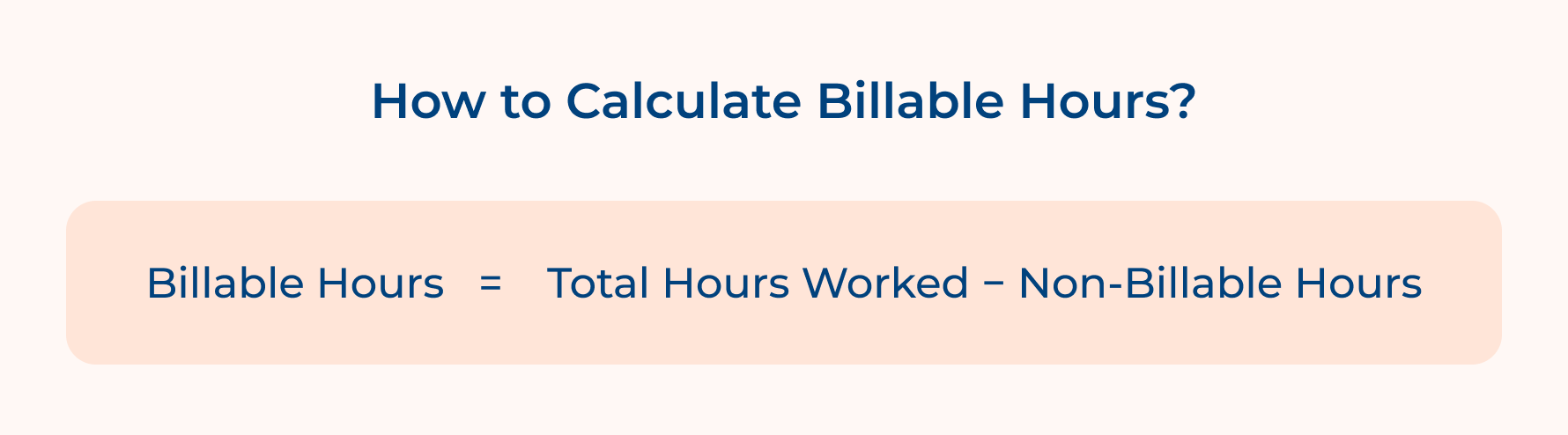
Formula:
Billable Hours = Total Hours Worked − Non-Billable Hours
- Total hours worked: Every hour logged by team members across all tasks during a specified time
- Non-billable hours: Hours spent on any task that is not tied to a client deliverable
- Billable hours: The remaining hours that can be directly invoiced to client projects
What is Considered a Good Billable Hour Rate?
The ideal billable ratio benchmark for most service firms is around 70% to 80% of total working hours, while below 60% means too much time is lost to non-client work. It needs an immediate review process.
Steps to Calculate Billable Hours Accurately:
- Track all hours worked: Team members need to enter all hours daily. It creates a complete view of where time is actually spent by your team across the project.
- Categorize each entry: segment all work hours based on billable or non-billable. It depends on the nature of the work, as miscategorization directly affects what gets invoiced to the client.
- Select the right tracking tool: Use a time-tracking tool such as Kooper, Veemo Projects, or Harvest to maintain consistent entries. The right tool streamlines automated entries and makes the entire tracking process faster.
- Add up total billable entries: Pull all billable entries and sum them up for each team member. Get the exact number that reflects actual output delivered during that period.
- Validate before invoicing: Reverify the total billable amount based on the project scope to make sure nothing is missed.
Example Calculation of Billable Hours:
Total Hours Worked = 50 hours
Non-Billable Hours:
Internal Meetings = 5 hours
Admin & Emails = 3 hours
Proposal Writing = 2 hours
Total Non-Billable = 10 hours
Billable Hours = 50 − 10 = 40 hours
Billable Ratio = (40 ÷ 50) × 100 = 80%
The outcome means 80% of the team’s time was billable and also stands within the healthy range for a well-maintained project.
What Are the Actual Hours?
Actual hours are the total time a team member spends across all work activities, regardless of billable and non-billable hours. It is the most honest measure of a team’s time distribution across a project.
Actual hours tracking gives managers a ground-level view of where time is going beyond what is invoiced. The difference between actual hours and billable hours is where most project inefficiencies hide, while smarter decisions need to be made for success.
Key Objectives:
- Workload visibility: Track the total time each team member is spending across all tasks
- Project health monitoring: Identify early scope creep before it begins to affect the project budget
- Resource planning: Make use of real-time data for allocating the right people to the right tasks in future projects
- Profitability assessment: Compare actual hours vs billable hours to measure the true cost of delivering a project
How to Calculate Actual Hours?
The right actual hours calculation gives managers a true baseline to measure team efficiency and project profitability. Every resourcing and budgeting decision without this becomes guesswork.
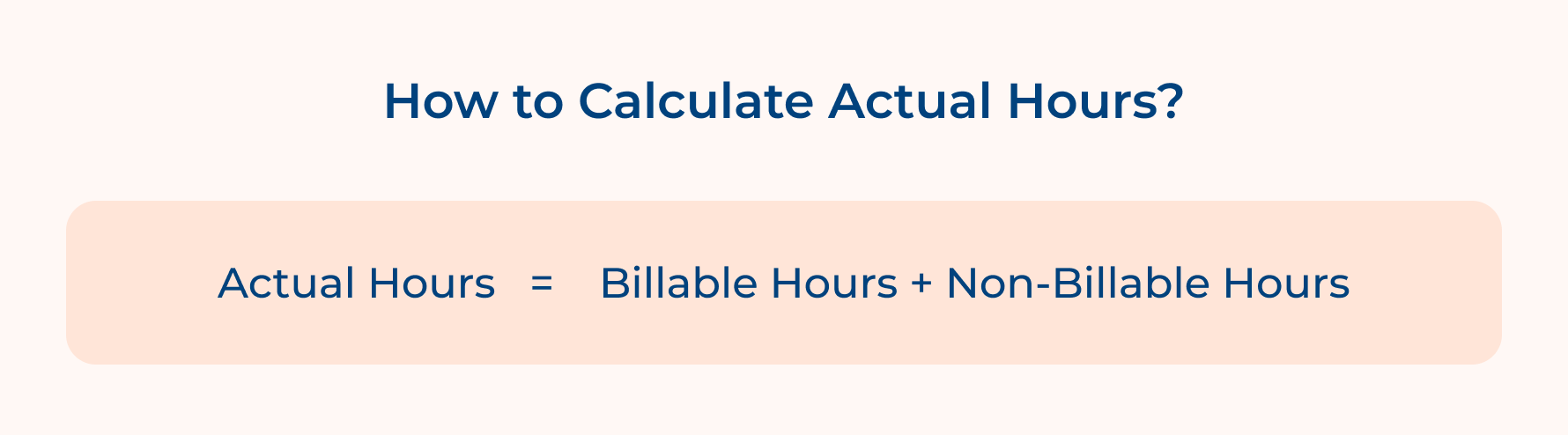
Formula:
Actual Hours = Billable Hours + Non-Billable Hours
- Billable Hours: All hours directly linked to the client are chargeable to the project
- Non-Billable Hours: Hours spent on internal tasks, admin work that are not invoiced to the client
- Actual Hours: The complete sum of every hour worked despite of its billable status
What Is Considered A Good Actual Hours Benchmark?
Actual hours must align closely with planned project hours and a well-managed team should see. For example, when actual hours exceed the estimate, it is a clear sign of revisiting and optimizing the scope or resource plan.
Process To Calculate Actual Hours Accurately:
- Log every hour without exception: Every team member records time spent on tasks, such as internal work and activities. Skipping non-billable hours creates a distorted picture of the team’s actual work.
- Use a centralized tracking system: All time entries should be recorded in a single tool to prevent double entries. Scattered spreadsheets lose accuracy in actual hour tracking.
- Separate billable and non-billable entries: Each entry needs to be tagged correctly to ensure the actual hours are clean. It also makes it easier to spot where non-billable time is growing beyond limits.
- Consolidate at the end of each period: Pull all billable and non-billable hours at the end of the billing cycle to get a complete, reliable actual hours total for that specific time period.
- Compare against the project estimate: Once actual hours are calculated, stack them against the original estimate. A consistent gap between billable and actual hours means the project planning needs to be updated early.
Example Calculation
Billable Hours = 40 hours
Non-Billable Hours:
– Internal Meetings = 5 hours
– Admin & Emails = 3 hours
– Proposal Writing = 2 hours
Total Non-Billable = 10 hours
Actual Hours = 40 + 10 = 50 hours
Efficiency Ratio = (40 ÷ 50) × 100 = 80%
The results show the team spent 80% of actual working time on billable work, while only 20% was absorbed by non-client activities. It is a healthy and sustainable split.
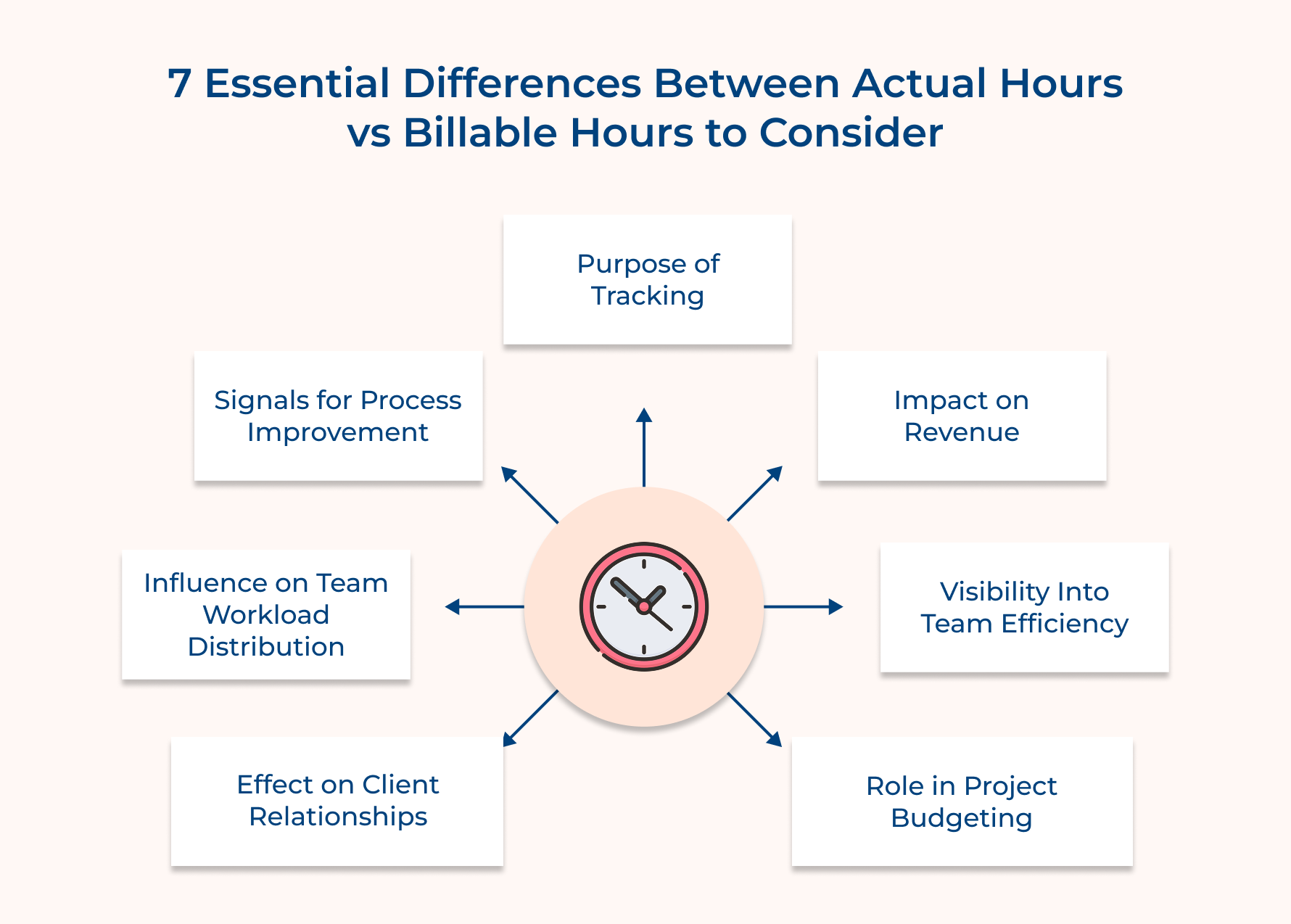
7 Essential Differences Between Actual Hours vs Billable Hours to Consider
These seven essential differences between actual vs billable hours help every professional to understand and optimize their business practices.
1. Purpose of Tracking
Billable hours keep a record of the time charged to a client based on a specific deliverable or milestone. Every billable entry is a revenue entry that impacts the project’s financial goal and outcome.
So, what happens when you track billable hours without a scope agreement? It leads to billing disputes and underpayment. It is all about protecting the team’s effort with a proper record of work delivered.
A strong billable hour tracking system covers:
- Billable hours create a direct link between time spent and client scope items
- Billable entries that serve as documented proof of client work delivered
Actual hours in comparison with billable hours give managers a clear analysis between total effort spent and the amount billed. It reveals how efficiently the team is operating apart from client-facing work.
Operational inefficiencies stay invisible without tracking actual hours until they become a serious cost problem. Between actual vs billable hours, the comparison comes to one question that billable hours never answer: “Where is the rest of the team’s time actually going?”
Start validating your actual hour-tracking purpose with these questions:
- Do you review actual hours regularly or only at the end of the project?
- Does your team know why actual hour tracking matters apart from invoicing?
2. Impact on Revenue
Billable hours have a direct impact on the revenue that the project generates. Every unbilled hour that should have been captured is lost revenue that cannot be recovered once the invoice is developed.
Small gaps in tracking, such as a 30-minute client call or a quick revision, lead to a revenue loss over a month. Most teams undercharge because they fail to capture all billable moments consistently.
Consider these questions to protect billable revenue from slipping:
- Is your team keeping track of all client interactions?
- Are there tasks that are labeled as billable but are absorbed as internal overhead?
Actual hours, although does not have any direct revenue impact, still reveal the true cost of delivering a project. Situation when actual hours far exceed billable hours, the business subsidizes client work without realizing it, leading to revenue loss and dissatisfaction.
A profitable project is one in which the comparison between billable and actual stays close to each other across the delivery.
Key Takeaways:
- Billable hours are directly linked to invoicing and revenue recovery for every project
- Actual hours reveal any hidden delivery costs that quietly eat into your project margins
3. Visibility Into Team Efficiency
Billable hours only keep a record of all charged tasks, but never reveal your team’s effort to produce that output. For example, a team logging 40 billable hours might have worked 70 actual hours. This gap tells a deeply important story of the delivery.
The difference between High actual hours vs low billable hours is an early sign of inefficiency that happens only when teams focus on what they invoice.
So, what is a billable hour efficiency visibility cover?
- Billable hours measure the output value of the deliverable based on the time worked
- Billable benchmarks built without a real-time context of the actual hour always produce incomplete conclusions
The comparison tracking of actual vs. billable hours is all about setting a benchmark that no other metric can provide. They show not just how much was delivered but how much effort it truly cost the team to deliver it.
Actual hours, when compared to actuals across similar projects, identify team efficiency. It is the most powerful input a manager has for team health management.
4. Role in Project Budgeting
Billable hours are the foundation of client-facing budget conversations and project cost estimation. During the scope definition for a new project, the estimated billable hours directly determine the price quoted to the client.
Actual hours help in calculating the real cost of delivery by capturing the hours the team spent, such as all work that never made it to an invoice. It helps in the proper internal budgeting of the project.
So what does an actual hour budget look like when done?
- Actual hours from delivered projects are stored for setting internal cost benchmarks
- Regular comparison of actual vs billable hours during delivery catches budget overruns
5. Effect on Client Relationships
Billable hours define the client’s perception of the transparency of work being delivered. A well-documented billable hours tied to clear deliverables makes clients rarely question the invoice they receive.
Inconsistency in billing damages client trust in a long-running project. A detailed breakdown not only justifies the cost but also actively reinforces the team’s credibility.
Transparent billable hour reporting should cover a healthy relationship:
- Each billable entry is clearly described for clients to explain the progress
- Summaries of billable hours are shared proactively at key milestones instead of during invoice time
- Entry disputes are resolved with properly documented logs instead of verbal justifications
Actual hours are an internal metric that clients rarely see, but they influence delivery quality. Poor management of actual hours builds internal pressure and affects the quality of output.
A team consistently overworked on actual hours vs billable hours will start cutting corners even when it looks healthy. It acts as the hidden connection between actual hour management and long-term client satisfaction.
6. Influence on Team Workload Distribution
Billable hours build a skewed view of workload if used as the only measure of team member involvement. Managers who heavily depend on billable hours alone cause resourcing mistakes.
Consider asking these questions when reviewing workload distribution:
- Is the workload assigned based on billable capacity and actual hour availability?
- Are there any team members whose actual hours are higher than their billable output?
- Is the current workload good enough for the next 4 to 6 weeks without burnout?
Actual hours give a more accurate picture of workload distribution across the team. It captures the full weight, along with all the invisible non-billable work that is never added to the client invoice.
In comparison between actual vs billable hours, the primary workload input ensures resourcing decisions are based on reality to prevent a small group of team members from quietly absorbing a disproportionate amount.
Key Takeaways:
- Billable hours: Show client-facing output but hide the workload of individuals
- Actual hours: Reveal the real-time view for fair and sustainable work distribution-
7. Signals for Process Improvement
Billable hours tracking identity scope that consistently falls short of the originally scoped. It is the perfect time to audit the entire tracking and categorization process when billable hours drop below the estimate.
Actual hours in comparison to billable hours signal process improvement from a different angle that highlights where internal workflows are creating time drain and revenue loss.
The difference between actual and billable hours is the map of the team’s effort being lost while the operational changes have the highest impact.
An actual hour process improvement review includes:
- Monthly non-billable activities are audited in a quarter to identify if it is needed to be reduced or eliminated
- Process changes are measured by tracking the billable-to-actual-hour ratio.
How to Track Actual Vs Billable Hours: 6 Key Methods?
Actual vs billable hours tracking keeps projects financially healthy and teams operationally efficient across the execution level.
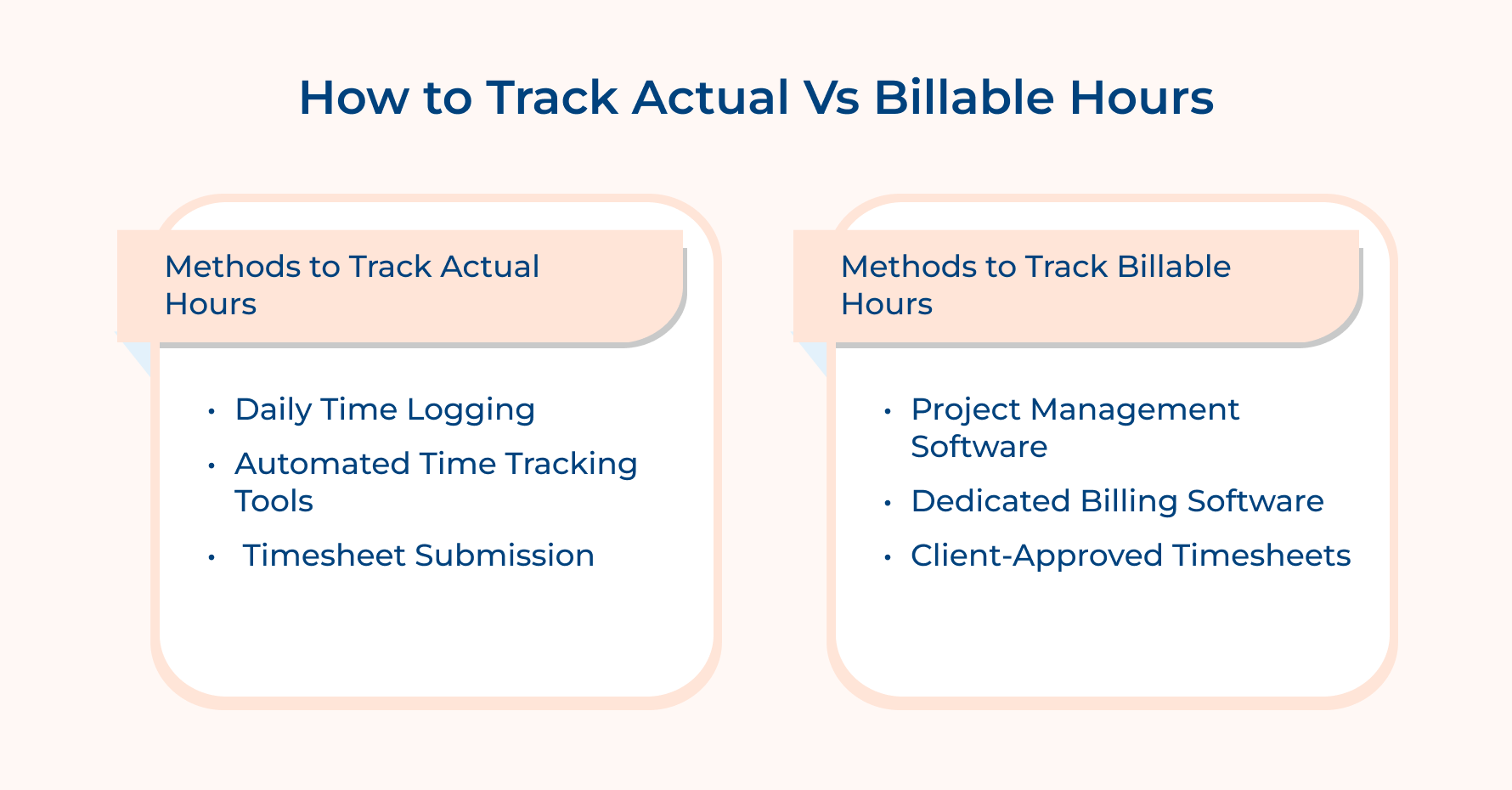
Methods to Track Actual Hours
1. Daily Time Logging
Daily time logging is the most reliable method to capture actual hours without gaps. Every team member records their hours at the end of the working day based on the specific tasks done.
So, how to implement daily logging?
- Maintain proper logging on the same.
- Every billable entry needs a proper task description
- Perform a quick daily audit to catch missing or vague entries
2. Automated Time Tracking Tools
Automated tracking tools such as Kooper or Veemo projects are used in the background to record time spent on each task without depending on manual input. It reduces human error and captures actual as well as billable hours more accurately.
This approach works well for teams switching across multiple projects. The data generated from this is clean and ready for analysis without any cleanup effort.
3. Timesheet Submission
Weekly timesheet submissions provide your team with a structured format to report actual hours against predefined project tasks. This is ideal when timesheets are tied directly to project phases instead of generic task categories.
Methods to Track Billable Hours
4. Project Management Software
Project management software enables teams to log billable hours directly against specific tasks and milestones. It creates a direct link between the billable hours and the actual hours that need to be invoiced to the client.
5. Dedicated Billing Software
Dedicated billing tools are built to capture billable hours and convert them into client invoices. The method significantly reduces risk of billable hours slipping through the cracks. The direct connection removes an entire layer of manual work from the billing process.
6. Client-Approved Timesheets
Client-approved timesheets need the client to sign off on logged hours before an invoice is generated. It builds complete transparency into the billing process and virtually eliminates any invoice disputes.
This works exceptionally well on long-term retainer projects in which billing happens based on a recurring monthly cycle.
So, what should a timesheet include?
- Weekly billable hours are shared with the client in an easy-to-read format.
- Approved timesheets are stored as official records and attached to every invoice.
Transform your Time Management with Billable Hours Vs Actual Hours.
The difference between billable hours and actual hours is not about profitability. Every untracked hour is directly linked to revenue and a missed opportunity to improve the team’s operations.
- Billable hours protect revenue when every chargeable task is captured consistently and accurately
- Actual hours reveal the true cost of delivery and expose inefficiencies that billable data never show
- The gap between them is where most project profitability problems start and scale
Ready to take control of your team’s time tracking? Start a free trial of a time tracking tool and log both from the start. Billable hours vs actual hours mastering separates teams that stay profitable from those that undercharge. The correct method requires consistent tracking and a clear process.
Limit time — not creativity
Everything you need for customer support, marketing & sales.

Neeti Singh is a passionate content writer at Kooper, where he transforms complex concepts into clear, engaging and actionable content. With a keen eye for detail and a love for technology, Tushar Joshi crafts blog posts, guides and articles that help readers navigate the fast-evolving world of software solutions.