8 Best Spreadsheet Alternatives for Resource Management
- What is Resource Management?
- Why is Resource Management a Better Alternative to Spreadsheets?
- Key Benefits of Using a Spreadsheet Alternatives for Resource Planning
- Limitations of Spreadsheets for Resource Management & Planning Alternatives
- 8 Best Spreadsheet Alternatives for Resource Management & Planning
- Upgrade Your Resource Planning and Management With the Best Spreadsheet Alternatives
- FAQs about Spreadsheet Alternatives for Resource Management
Key Highlights:
- Spreadsheet alternatives for resource management provide real-time visibility that static files can never deliver.
- 90% of spreadsheets contain errors which can be eliminated with purpose-built resource planning tools with allocation workflows.
- Kooper is an all-in-one business management platform that replaces spreadsheets with accurate forecasting and conflict detection.
Do you know why so many resource plans fail mid-project despite hours spent building spreadsheets? Spreadsheets are not designed for dynamic resource management.
Teams using resource planning tools are 2x more productive in project delivery compared to those relying on spreadsheets. Spreadsheet alternatives for resource management are platforms that manage real-time scheduling, capacity forecasting and workload visualisation in one unified system.
Explore the eight best spreadsheet alternatives for resource management, starting from PSA platforms like Kooper to dedicated scheduling tools such as Runn. You will leave with a clear idea of which tool is best for your team’s size, workflow and demands.
What is Resource Management?
Resource management is the process of planning, allocating and controlling resources. It includes people, time, budget and tools to deliver tasks efficiently. It makes sure that no resources get wasted and everything runs on schedule.
Most teams do not understand the value of resources until a project starts slipping. The right resource management solution keeps a record of available people in one place and when they are available, which is a replacement for a spreadsheet.
So what is resource management all about? It is not only filling calendars or assigning tasks but also directly impacts project outcomes and team morale. It defines how well a business can scale without burning resources.
Key objectives:
- Maximise utilisation: Make sure every resource is assigned at an optimal capacity without being underloaded.
- Reduce bottlenecks: Identify workload imbalances before slowing down entire project timelines.
- Improve forecasting: Predict future resource needs based on current workload data and upcoming project pipelines.
- Increase accountability: A clear visibility of entire task ownership across all deliverables.
Why is Resource Management a Better Alternative to Spreadsheets?
Spreadsheets are purpose-built for calculations and data storage, while resource planning is considered an alternative to it because it manages resources, data, as well as project timelines at the same time. Once a team scales, projects start overlapping and the cracks in the spreadsheet show up fast.
- Almost 90% of spreadsheets contain errors, still the majority of projects depend on it which leads to a loss of productivity margin.
- Over half of organizations still use spreadsheets for capacity planning, tracking availability, skills or forecasting capacity, despite having modern tools that offer purpose-built alternatives.
- Most people spend 38% of their time in spreadsheets, out of which some find it a chore, with an unintuitive interface slowing down teamwork.
- Teams that utilise project management software are twice as likely as businesses that rely on spreadsheets.
Resource management software offers real-time visibility into availability, overload, overloading and underallocation. This clarity is something that any spreadsheet formula can replicate.
Key Benefits of Using a Spreadsheet Alternatives for Resource Planning
Replacement of spreadsheets with any resource allocation solution is about giving your team the infrastructure to plan and deliver consistently.
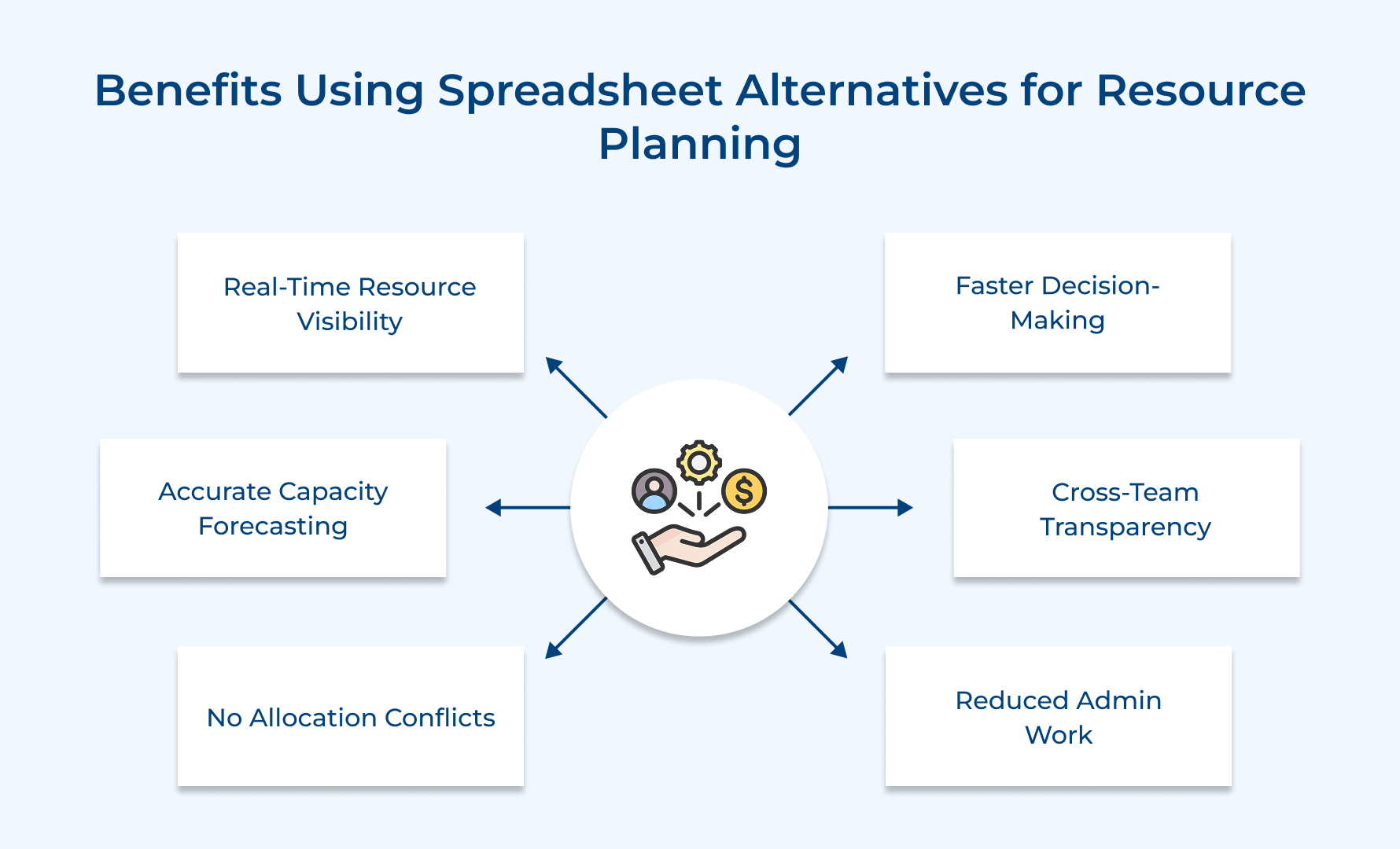
Real-Time Visibility Into Resource Availability
Think resource planning tools as an alternative, as it helps managers to get real visibility of people, technology and budget all in one live dashboard. Spreadsheets only give a snapshot of the past without any detailed action plan.
Accurate Capacity Forecasting Without Complex Formulas
Purpose-built tools help teams plan future workloads against actual availability. Spreadsheet only builds fragile nested formulas that break when someone edits a cell. It means forecasting becomes a strategic conversation instead of a spreadsheet maintenance task.
Elimination of Double-Booking and Allocation Conflicts
Situation when resources are managed in spreadsheets, double-booking is not the concern, but instead occurs when. The right resource planning solution flags conflicts automatically before it creates delays.
Faster and More Confident Decision-Making
Managers spend less time chasing updates when all resource data lives in one connected system. The speed to respond to shifting priorities reflects how well resource management works as a replacement for spreadsheets.
Better Cross-Team Collaboration and Transparency
Resource management is considered an alternative to spreadsheets as it gives every stakeholder a shared view of workload and priorities. Spreadsheet creates information silos where each team operates on a different version.
Reduced Administrative Overhead for Project Managers
Most project managers’ week gets consumed by updating spreadsheets and reconciling conflicting data. A Resource planning tool automates the routine updates and keeps data accurate without manual intervention.
Limitations of Spreadsheets for Resource Management & Planning Alternatives
Spreadsheets, when it comes to resource management at any real scale, create more problems than solutions.
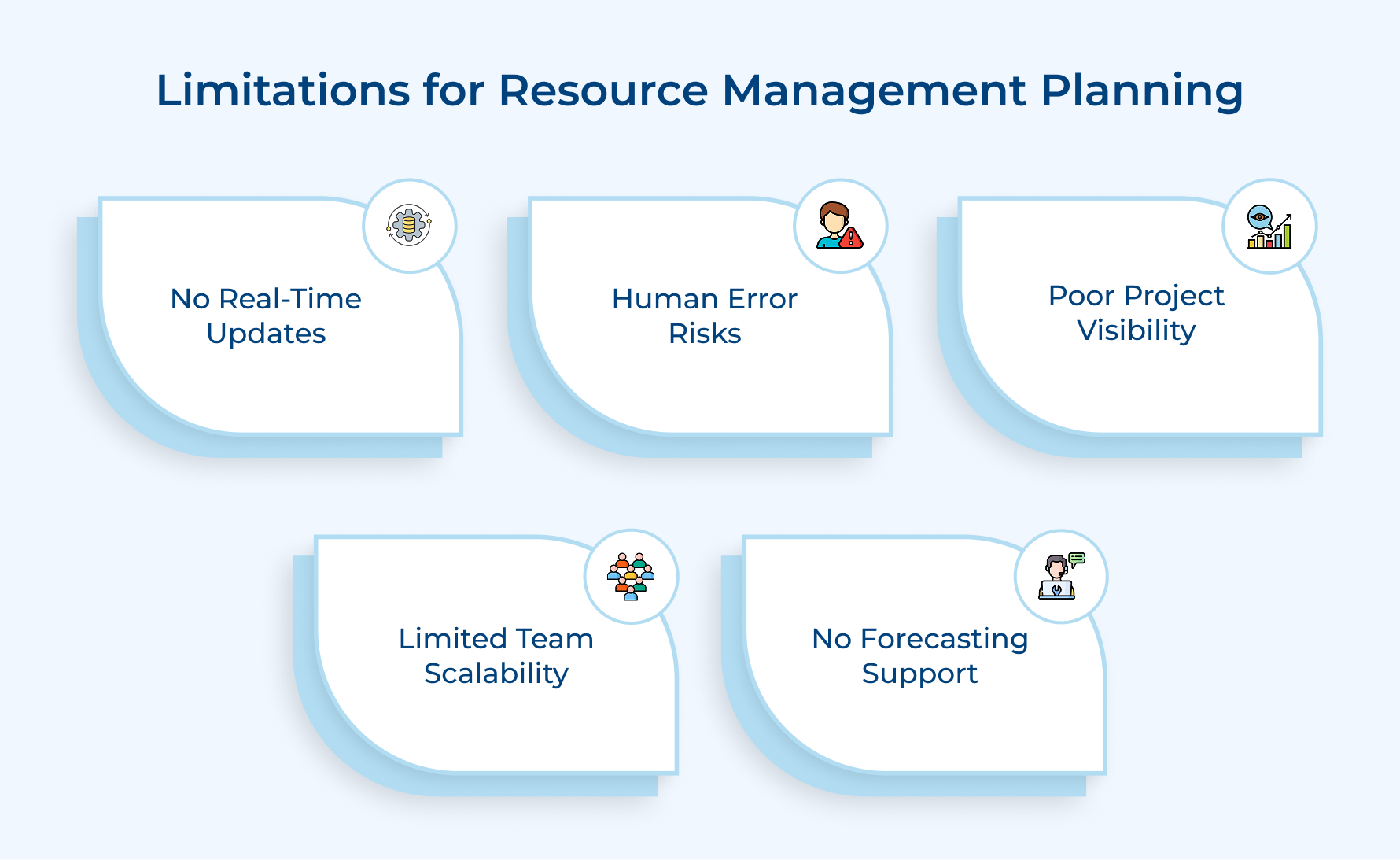
1. No Real-Time Data Updates
So here’s the first reason why most firms use a resource planning tool as a replacement for looking at spreadsheets? Situation when the project scope changes, someone has to manually update the spreadsheet. Stale data does not just confuse. It causes misallocation and reactive decision-making.
2. High Risk of Human Error
A single incorrect formula in a spreadsheet can accidentally overwrite a cell and can silently corrupt an entire resource plan. Unlike other resource allocation templates, spreadsheets have no protection. Nothing is there to stop a well-meaning team member from breaking.
3. Zero Visibility Across Multiple Projects
Tracking resource planning across multiple projects in a single spreadsheet is similar to asking a cricketer to bat and bowl at the same time, leading to looking for alternatives. In a spreadsheet, there is no unified view of over-allocation, under-allocation or any conflict.
4. Inability to Scale With Team Growth
Scalability is the main cause of spreadsheet replacement in most firms. It can easily work for a six member team, but becomes unmanageable when the team grows across multiple departments. The more complexity added, the faster a spreadsheet collapses.
5. No Built-In Forecasting or Scenario Planning
A “what-if” scenario in a spreadsheet means duplicating files, manually adjusting dozens of cells, and nothing breaks in the process. The right solution handles scenario modelling, giving managers the confidence to make decisions without rebuilding the entire plan from scratch.
8 Best Spreadsheet Alternatives for Resource Management & Planning
The right resource planning or allocation tools work more than any spreadsheet can offer, giving teams the visibility, control and flexibility without the chaos.
Kooper
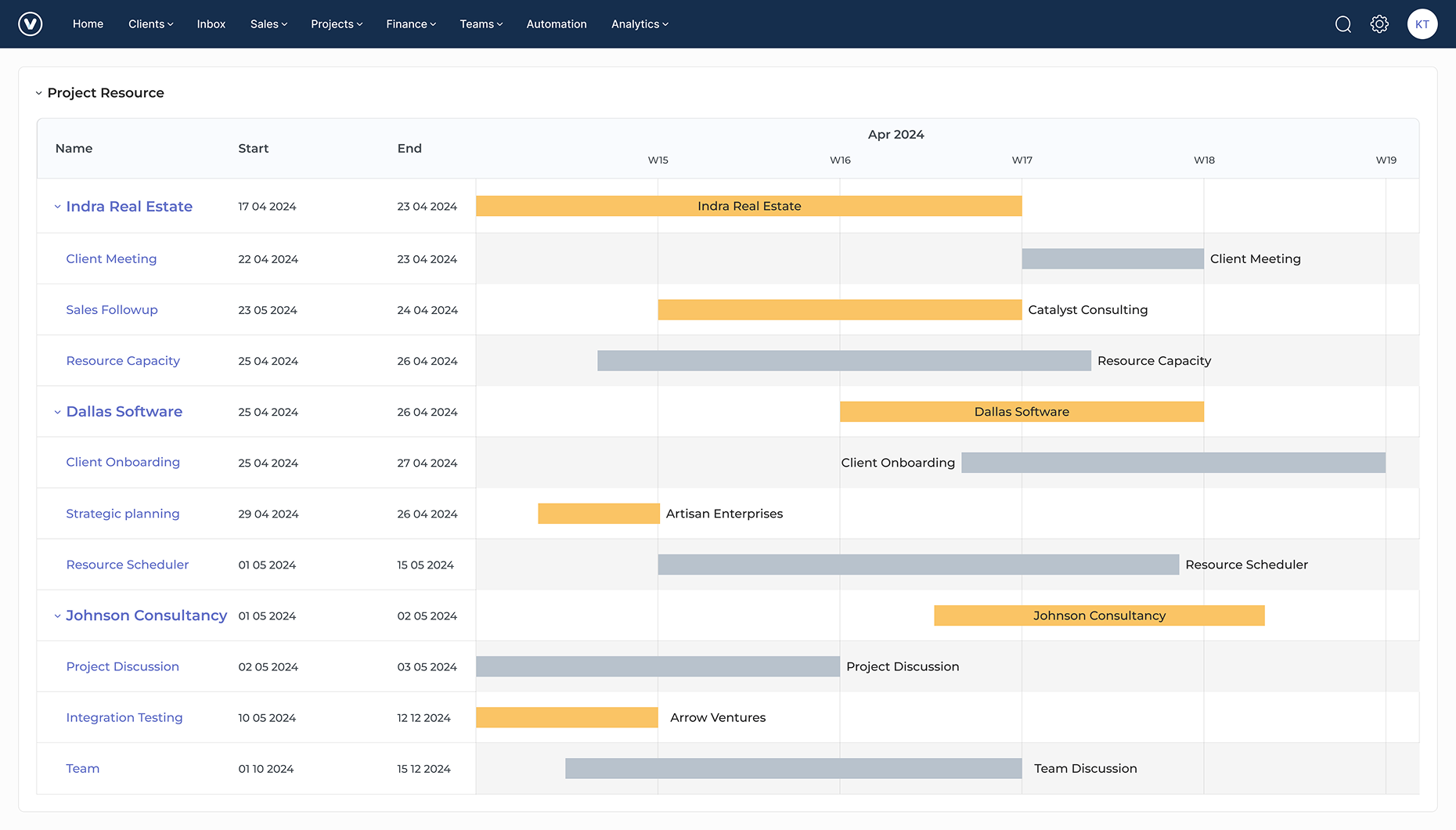
Kooper is an AI-powered professional services automation (PSA) Software for agencies and consulting firms that need project management, resource planning, as well as financial tracking in a unified place. It removes the switching between separate tools for each of the functions, keeping operations connected from project kickoff to final invoice.
Teams that rely on spreadsheets for resource planning lose real-time visibility during project scope changes, leading to a search for alternatives or a replacement. Kooper gives managers a live scheduling view for allocating, managing, and updating project timelines with workflow automation.
Key features:
- Resource scheduling: Drag-and-drop scheduling showing real-time resource availability across the entire team.
- Capacity planning: Managers can identify overload and availability gaps before they start impacting project delivery.
- Budget tracking: Project budgets sync with resource allocations for clear visibility in financial burn alongside workload in real time.
- Time tracking: Built-in time logging for project tasks and billing to eliminate the need for a separate time tracking tool.
- Profitability reporting: Detailed analytics and reporting that includes KPIs such as resource costs, project margins or revenue to provide leadership with a clear view of performance.
Rocketlane
Rocketlane is built for service firms that need resource planning and project execution in a unified workspace. The software eliminates the use of these two workflows separately, helping the team focus more on deliverables.
So what makes Rockellane different from a standard project management tool? Dedicated resource scheduling, project resource planning templates and client portal all work together. It keeps your teams aligned internally as well as externally.
Pros:
- The client portal keeps external stakeholders aligned without an extra communication platform.
The entire delivery plan updates accordingly without manual reconciliation when a resource gets reassigned. Teams handling high volumes of agile projects will find that the balance between resource load and live milestones is hard to replicate.
Cons:
- Not ideal for internal-only teams with no client-facing delivery work.
- The reporting dashboard feels limited for teams with complex resource tracking needs.
Paymo
Paymo is a strong software for small to mid-sized teams that need resource scheduling, time tracking and project management with affordable pricing. It also provides workload planning and billable hour tracking in one place, which others cannot provide at this price point.
Can Paymo handle real resource management? The workload view provides managers with a clear view of your team’s over and underallocation. It eliminates hours that are typically needed for disconnected spreadsheet files.
Pros:
- Time tracking connects to invoicing, which is best for agencies and freelancers.
- Workload management makes over-allocation easy to spot and fix.
Cons:
- User interface feels outdated in comparison to more modern resource planning tools.
- Limited scalability for larger enterprises that manage complex multi-department needs.
Runn
Runn is a resource planning and capacity forecasting tool which is an ideal alternative to spreadsheets, as it shows in every feature that the platform delivers. Unlike general project management tools, Runn treats resource visibility as the entire product.
What does it actually look like in practice? Managers get a live utilisation dashboard with drag-and-drop scheduling and pipeline forecasting without a single formula like a spreadsheet to maintain.
Pros:
- Capacity forecasting for team plans without building a complex manual formula.
- The drag-and-drop interface makes scheduling user-friendly.
Runn genuinely makes it unique with its ability to model future hiring needs against the incoming project. That gives data to make resourcing decisions before a capacity gap escalates to a delivery problem.
Cons:
- Deep project execution features are missing works best when combined with a dedicated PM tool.
- Rum feels resource-focused for teams that are looking for an all-in-one solution.
Kantata
Kantata is considered the best alternative for a spreadsheet as it provides tight control over resource planning and capacity planning, as well as business performance in one platform.
The platform allows managers to match resources to agile projects based on skills, role and real-time availability that moves allocation decisions beyond guesswork. The level of precision reduces the risk of putting the wrong allocation on an important client deliverable.
Pros:
- Resource matching based on skills reduces misallocation on complex projects.
- Integrate financial tools and resource utilization directly to profitability reporting.
So, for whom was the Kantata actually built? Businesses running multiple concurrent client engagements find that it connects resource decisions directly to revenue outcomes. It gives a line of sight on resource management, making it an ideal replacement for spreadsheets ever provided.
Cons:
- Adaptation is complex and needs dedicated onboarding support to set up correctly.
- Pricing makes it non-accessible for smaller teams outside of professional services.
Scoro
Scoro is all in one business management platform that offers resource planning, project management, CRM and financial reporting in one place. Teams are tired of switching between platforms. Scoro makes that operation frictionless entirely.
Resource scheduling features connect directly to project budgets and time tracking. So managers know not just who is working, but the cost of the allocation in real time. The financial layer sets Scoro apart from most standalone resource planning tools.
Cons:
- Feature depth feels complicated when it only needs straightforward resource planning functionality.
- Higher learning curve during adaptation in comparison to more focused resource management tools.
Resource Guru
Resource Guru is one of the best resource planning and management tools available in replacement of spreadsheets. Teams that are looking for a clean availability tracking without complexity will find it usable.
Pros:
- Adaptation and onboarding rates are minimal for new teams.
- Built-in clash detection to prevent double-booking before it creates project problems.
Now the question is, why does clash detection matter so much? Double-booking creates overloaded team members, missed deadlines that quietly fall behind before being noticed.
Cons:
- Deeper project management features are missing, making it purely a scheduling and availability tool.
- Reporting capabilities are basic in comparison to more comprehensive resource planning platforms.
Monday.com
Monday.com flexible work operating system that can be configured for resource management. It offers an elaborate setup to use it effectively in that capacity and handles project tracking well.
The platform’s visual workload lets managers see team capacity across multiple agile projects without losing deadlines. The automation features in Monday.com reduce the manual updating that resource management demands.
Pros:
- Highly customisable to fit almost any resource planning workflow.
- Reduce manual workload updates across all active projects.
Already using Monday.com for project tracking? Extending it into resource planning to make it an alternative to spreadsheets. It keeps all projects in one connected system without adding a tool to the stack.
Cons:
- The resource management feature requires significant manual configuration.
- Become expensive quickly as the team scales and more advanced feature tiers are needed.
Upgrade Your Resource Planning and Management With the Best Spreadsheet Alternatives
Spreadsheets create a false sense of control. The longer teams rely on it for resource management, the more damage builds up. The right spreadsheet alternative fundamentally changes team plans, allocation and work deliverables at scale.
- Eliminate double-booking and allocation conflicts that spreadsheets consistently fail to identify.
- Real-time visualisation of capacity and project budgets to make faster as well as accurate resourcing decisions.
- Kooper can scale based on different team sizes, delivery and operational needs.
Start a free trial to measure the difference. Teams that replace spreadsheets with resource management tools can also scale without the operational risk that manual planning carries.
Limit time — not creativity
Everything you need for customer support, marketing & sales.

Neeti Singh is a passionate content writer at Kooper, where he transforms complex concepts into clear, engaging and actionable content. With a keen eye for detail and a love for technology, Tushar Joshi crafts blog posts, guides and articles that help readers navigate the fast-evolving world of software solutions.