How to Measure and Improve Time to Fill in Hiring
- What is the Time to Fill?
- Why is Measuring the Time to Fill Important?
- Key Differences Between Time to Fill vs Time to Hire
- How to Calculate Time to Fill?
- How to Measure Time to Fill in 7 Effective Steps
- How to Reduce Time to Fill
- Resource Management Made Effortless with Time to Fill Metrics
- FAQs about Time to Fill

Key Highlights:
- Time to fill measures how long it takes to hire after posting a job.
- Delayed hiring increases costs, lowers morale and slows down business productivity.
- Tracking time to fill helps identify bottlenecks and improve recruitment speed.
You’ve probably seen it happen – a key position opens up and weeks go by without finding the right person. The team starts to feel the strain, deadlines slip and morale dips as everyone scrambles to cover extra work.
That vacant role costs your organization real money. Every day it remains open means lost productivity, delayed projects and burned-out employees.
That’s why tracking time to fill matters. It gives you a clear picture of your recruitment pipeline – where the slowdowns are, what needs improvement and how to hire faster. This guide will show you exactly how to measure and optimize it, so your team can stay focused as well as your business keeps moving forward.
What is the Time to Fill?
Time to fill measures the number of days between posting a job opening and when a candidate accepts your offer. This metric gives you a clear picture of how long your entire hiring process takes from start to finish.
A lengthy time to fill can hurt your business in real ways. You’re operating with understaffed teams while projects pile up and deadlines loom. Meanwhile your top candidates might accept offers elsewhere because they won’t wait around indefinitely. The longer positions stay open the more productivity and revenue opportunities slip away.
Key factors:
- Job complexity and seniority level: Senior specialized roles naturally take longer to fill than entry-level positions because you’re fishing in a smaller talent pool.
- Your employer brand strength: Companies that candidates actually want to work for attract applications faster as well as close deals quicker than unknown organizations.
- Recruitment process efficiency: Each additional interview round or approval layer you add extends your timeline by days or even weeks.
- Quality of your job description and compensation: Clear expectations paired with competitive pay speed things up while vague postings with low salaries drag the process out.
Why is Measuring the Time to Fill Important?
Tracking how long it takes to fill positions isn’t just about numbers on a spreadsheet. It reveals critical insights about your hiring health and helps you make smarter decisions about where to invest your recruitment resources.
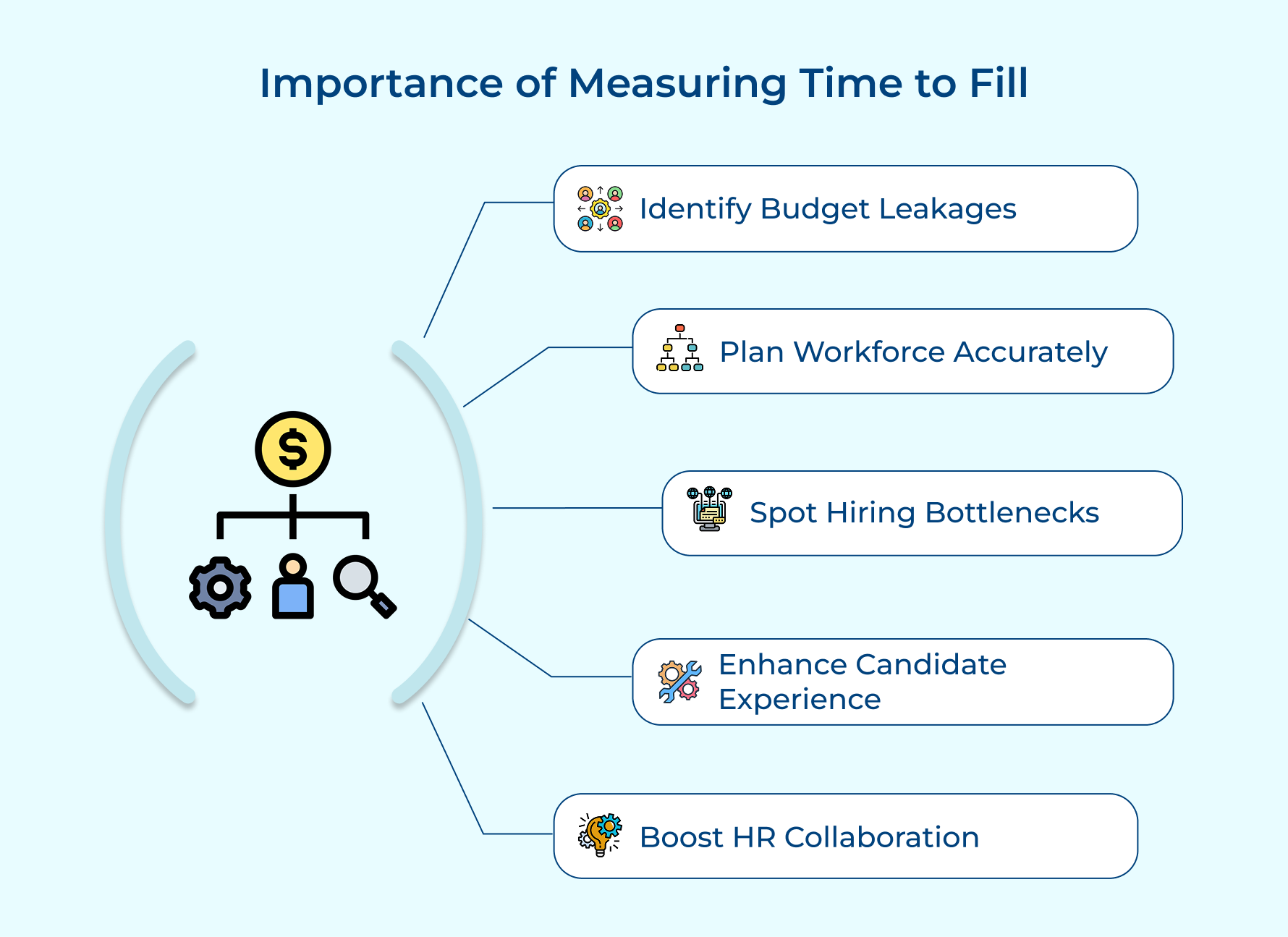
Shows you where Money is Leaking from your Budget
Every day a position stays empty costs you in lost productivity and overtime pay for existing staff. When you measure time to fill you can calculate the actual financial impact of slow hiring as well as build a business case for improving your recruitment process.
It Helps you Plan Workforce Needs More Accurately.
Once you know your average time to fill you can work backwards from project deadlines and predict when to start recruiting. It prevents last-minute scrambles while ensuring you have people in place exactly when you need them.
It Reveals Bottlenecks in your Hiring Workflow.
Maybe your interview scheduling takes forever or approvals get stuck on someone’s desk for weeks. Measuring time to fill forces you to examine each stage and identify exactly where candidates are getting stuck in your pipeline.
It Improves the Candidate Experience you Deliver.
Long drawn-out processes frustrate candidates and damage your reputation even among people you eventually hire. Tracking this metric pushes you to respect candidates’ time and keep momentum throughout the journey.
It Enables Better Collaboration Between HR and Hiring Managers.
When everyone sees the same timeline data they can have productive conversations about trade-offs between speed and quality. This shared visibility creates accountability and alignment around hiring goals.
Key Differences Between Time to Fill vs Time to Hire
These two metrics sound similar but they measure completely different parts of your recruitment journey. Understanding the distinction helps you diagnose problems more precisely and optimize the right stages of your hiring process.
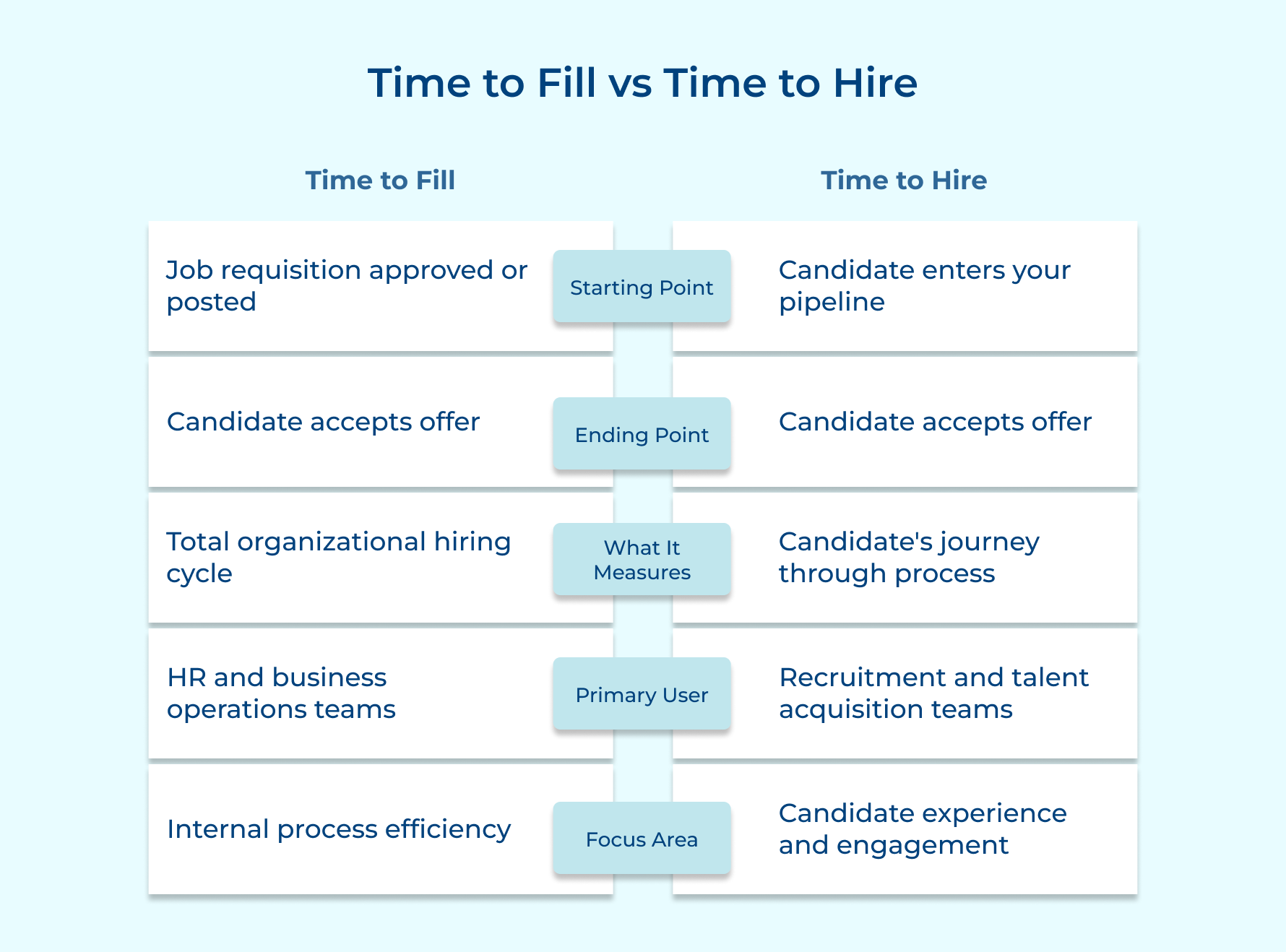
Starting Point of Measurement
The timer for time to fill starts the moment a job requisition is approved or a posting goes live. It even counts the behind-the-scenes prep work before applications roll in.
In contrast, time to hire begins only when a candidate enters your pipeline and tracks their personal journey through the process, from interviews to offer stage.
Scope of the Hiring Process
One metric captures the entire hiring lifecycle (from job posting to acceptance) giving leaders a big-picture view of how efficiently roles are filled.
The other focuses purely on the candidate experience, tracking what happens after they apply: interviews, feedback and negotiations. Together, they show both organizational speed and candidate responsiveness.
Primary Stakeholders Who Care
Business leaders and HR operations teams watch the broader hiring timeline closely since it affects headcount planning, project delivery as well as budget forecasts.
Recruiters and hiring managers care more about day-to-day movement — how quickly candidates progress as well as if they’re staying engaged throughout the process.
What Problems It Helps You Diagnose
A lengthy overall timeline usually signals deeper issues like delayed approvals, limited recruiting resources, or unclear job requirements.
On the flip side, when the candidate journey stretches too long, it’s often due to too many interviews, slow feedback, or scheduling bottlenecks that risk losing talent.
Impact on Business Outcomes
Productivity drops and projects stall especially when positions sit vacant for too long. Thus, hitting your bottom line hard.
However, when the candidate experience drags out, it’s your reputation that suffers. A slow, disjointed process can frustrate applicants and spread negative word-of-mouth, making future hiring even harder.
How to Calculate Time to Fill?
Calculating this metric is straightforward once you know your start and end dates. The math itself takes seconds but the real value comes from tracking it consistently and comparing results across different roles as well as time periods.
Formula

The formula might look simple but knowing exactly when to start and stop your stopwatch makes all the difference.
Date of job posting: This is the exact day your job opening goes live on your career page or job boards. Some organizations count from when the requisition gets approved instead but most companies prefer the posting date since that’s when active recruitment truly begins.
Date of offer acceptance: This marks the moment your chosen candidate formally accepts your employment offer either verbally or in writing. Don’t confuse this with their actual start date since that happens weeks later while including notice periods or personal commitments.
Example Calculation
Let’s walk through a real scenario to see how this works in practice.
Your company posts a Marketing Manager position on March 1st. After sourcing candidates and running interviews you extend an offer on April 12th. The candidate accepts that same day.
Time to Fill = April 12 – March 1 = 42 days
This means your recruitment process took six weeks from posting to acceptance. You can now compare this against your other marketing roles or your company average to spot patterns.
General Benchmark Across Industries
The average time to fill across most industries typically falls between 30 to 45 days depending on the position and market conditions. Understanding where your organization lands within this range helps you gauge if your hiring speed needs improvement.
These numbers shift constantly based on talent availability and economic cycles so treat them as directional guides rather than absolute targets:
- Industry-specific benchmarks: Technology and healthcare roles often stretch beyond 50 days while retail/hospitality positions might close in under 20 days because the talent pools as well as requirements differ dramatically.
- Role complexity: Entry-level positions average 25 to 35 days while executive searches can easily extend past 90 days since you’re evaluating fewer candidates more thoroughly.
- Company size and brand reputation: Startups without name recognition struggle with 50-plus day cycles while established brands attract faster applications and can close roles in 30 days.
- Geographical variations: Major cities with dense talent pools see faster fills around 35 days compared to rural areas where specialized roles might take 60 days or longer.
- Economic factors: During recessions when candidates have plentiful time to fill drops to 25 days but in tight labor markets it balloons to 50 days or more.
Time to Fill for Specific Roles and Departments
Technical roles like software engineers average 45 to 55 days while sales positions close faster at 30 to 40 days. Finance and accounting roles typically land in the middle around 40 to 45 days depending on certification requirements as well as experience levels.
How to Measure Time to Fill in 7 Effective Steps
Let’s walk you through an 8-step process to effectively measure and analyze your time-to-fill, ensuring you can attract as well as hire top talent swiftly while staying ahead of the competition.
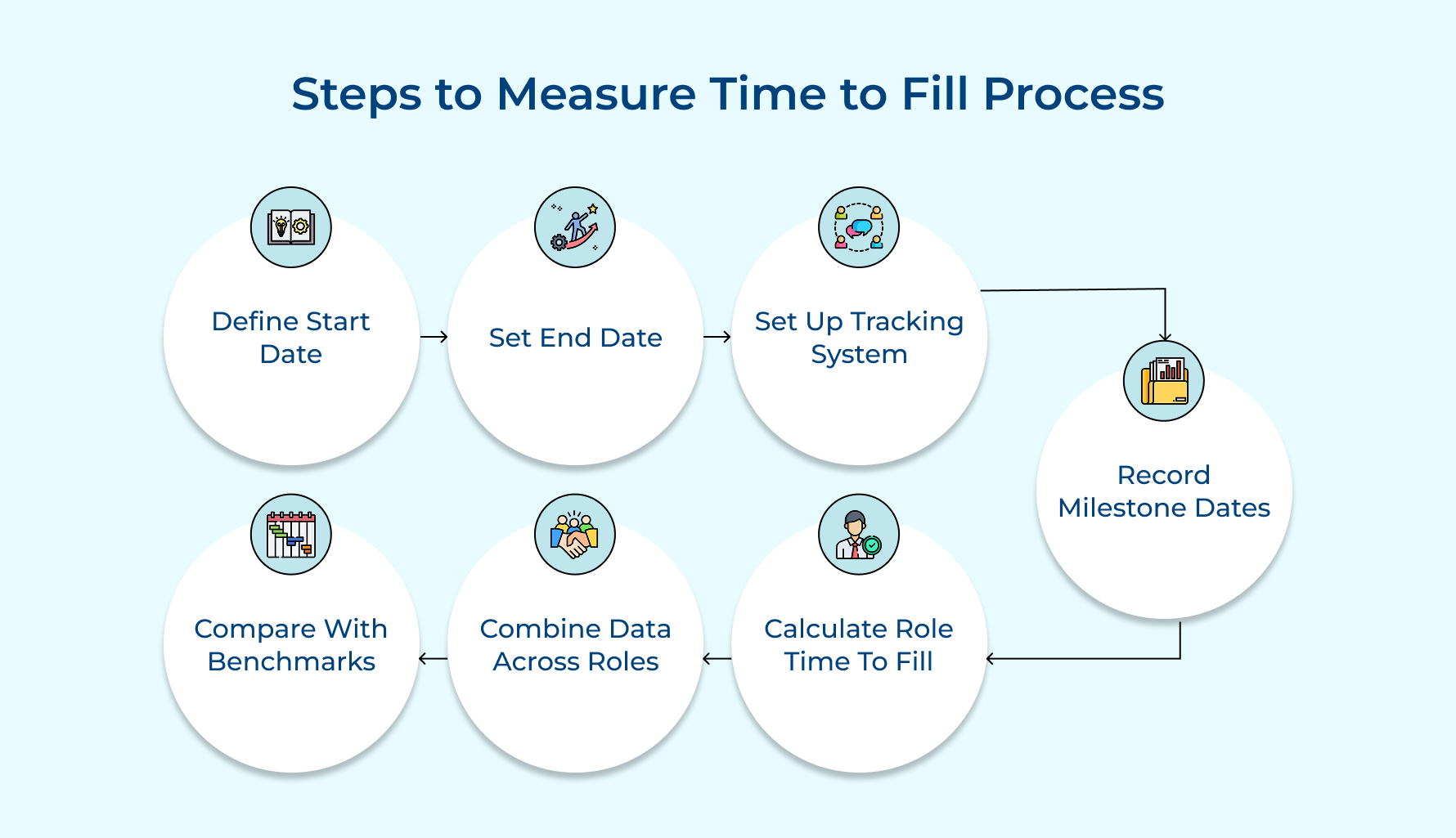
1. Define Your Measurement Start Date
When you decide where your time to fill the clock starts, you’re really deciding how much of your hiring process gets measured. That choice shapes how you compare results across teams and if you’re seeing the whole picture or just a slice of it.
There are a few common ways to set that start date. Some companies begin counting from job requisition approval, which includes everything (from writing job descriptions to getting budgets cleared). Others start from the job posting date, focusing only on active recruiting, which makes benchmarking easier.
For example, if your finance director requests a new accountant on January 5, HR approves it on January 12 and the job goes live on January 20 — starting from approval counts those prep days too, while starting from the posting focuses purely on the recruitment phase.
2. Establish Your Measurement End Date
The end date of your time-to-fill metric marks when you stop counting and consider a role filled. While it sounds simple, companies define this point differently based on how cautious they want to be. Choosing wisely matters because it affects accuracy and insights.
Common endpoint options:
- Verbal acceptance: Quick but risky since candidates can still back out.
- Written acceptance: Offers proof but doesn’t prevent last-minute withdrawals.
- Signed contract: Most reliable, especially where contracts are standard practice.
Use this endpoint to calculate total hiring time, then track post-acceptance dropouts separately to understand both hiring speed and offer stability.
Pro tips:
- Record both verbal and written acceptance dates to spot withdrawal patterns.
- If dropouts are frequent, measure up to the start date and track the gap as a retention issue.
3. Set Up Your Tracking System
A solid tracking system should do the heavy lifting, capturing every key date automatically so recruiters don’t have to juggle manual entries during hectic hiring cycles. Without it, you’ll end up with patchy data and no real insight into what’s slowing things down or who’s performing well.
When setting up your tracking infrastructure, focus on:
- Data accuracy: Use a consistent date format so everyone measures the same milestones.
- Automation: Choose tools that auto-timestamp events like job postings or offer acceptances.
- Reporting and visualization: Dashboards turn raw data into clear trends and patterns.
- Accessibility: Make sure stakeholders can easily view metrics without navigating complex systems.
The best setup combines your ATS with automated reporting tools. Platforms like Greenhouse or Lever already track most data, you just need to configure reports and train your team to use them effectively.
4. Document All Critical Milestone Dates
Tracking every key event in your hiring process gives you the insight to see exactly where and why delays occur. Many teams only log the start and end dates, but real progress comes from spotting where things slow down — if candidates wait weeks between interviews or offers sit unapproved for days.
Before you start collecting data, ask yourself:
- Which milestones actually affect hiring speed or candidate experience?
- Who’s responsible for recording each timestamp?
- How do we maintain consistency across different recruiters and roles?
- What’s our plan for using this detailed data once we have it?
The most important step? Automate it. Configure your ATS to capture timestamps for applications, interviews and offers automatically. This keeps your data complete, accurate and effortless.
5. Calculate Individual Role Time to Fill
This is where you turn raw dates into actual numbers that reveal how long each position took to fill. Without this calculation you can’t spot patterns or identify which positions consistently drag on forever versus which ones close quickly.
How to Calculate Individual Role Time to Fill
Start by pulling the end date and start date for each completed hire. Let’s say you posted a Sales Manager role on February 1st and the candidate accepted on March 15th.
Basic Calculation:
March 15 – February 1 = 42 calendar days
Converting to Business Days:
Remove weekends and holidays from your count. Those 42 calendar days become 30 business days once you exclude non-working time.
Recording the Result:
Log this 30-day figure in your system along with department and role level as well as recruiter name.
Some organizations exclude time when positions were on hold due to budget freezes from their calculations. This gives you a cleaner picture of active recruitment time but documents these adjustments consistently across all roles.
6. Aggregate Data Across Multiple Positions
Aggregating combines individual role data into meaningful averages that show broader patterns across your organization or specific departments.
A single role’s time to fill tells you almost nothing but twenty engineering hires reveal if your tech recruitment needs systemic improvement.
You can use aggregated data to set realistic goals for future hiring and allocate budget based on which departments struggle most. Leadership needs these company-wide numbers to understand if the recruitment speed is helping or hurting business objectives.
Pro tips:
- Calculate both mean and median because a few extremely long fills can skew your average as well as hide that most roles close reasonably fast.
- Break down data by quarter to catch seasonal trends like summer hiring slowdowns that affect your timelines.
7. Compare Against Industry Benchmarks and Goals
This step puts your numbers in context by showing if your hiring speed is competitive or faster competitors are winning talent. Without comparison you might celebrate a 40-day average while industry peers fill similar roles in 25 days.
You need external benchmarks and internal goals to evaluate performance properly. Here are three approaches that give you the full competitive picture.
- Research industry standards from HR associations and surveys: Organizations like SHRM and LinkedIn publish annual recruitment benchmark reports breaking down average time to fill by industry as well as role type. These give you realistic targets based on what similar companies actually achieve.
- Identify gaps between current performance and target speeds: Compare your departmental averages against industry benchmarks and your historical performance. If engineering averaged 50 days but your target is 40 days you know exactly how much improvement you need.
The challenge is finding comparable benchmark data because your circumstances might justify different speeds than generic industry averages. Overcome this by building peer groups of similar companies and asking your network what timelines they’re seeing rather than relying solely on published reports.
How to Reduce Time to Fill
Speeding up your hiring process isn’t about cutting corners or sacrificing quality. Six Strategies to Accelerate Your Hiring
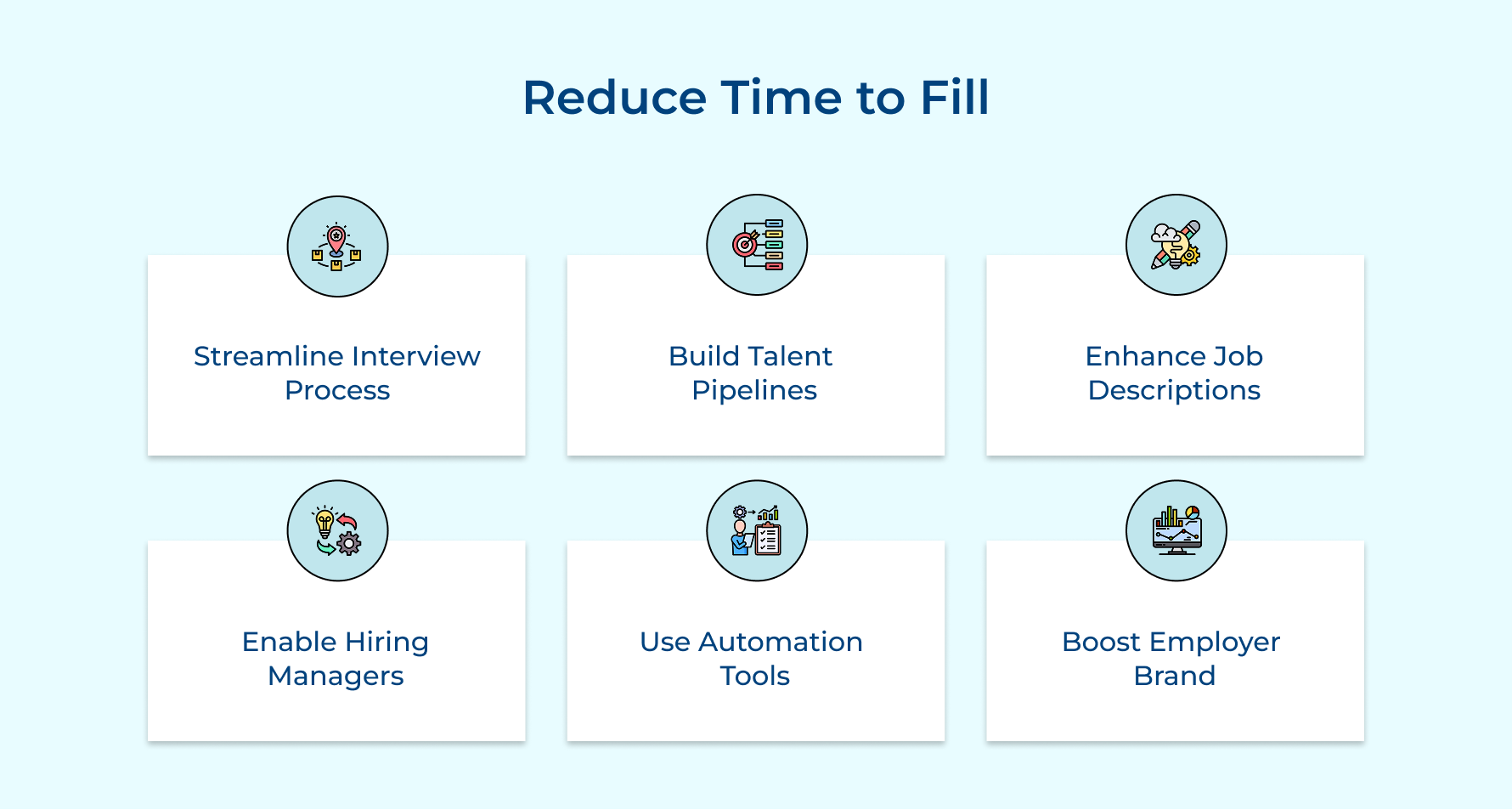
- Streamline interview rounds: Many organizations default to four or five interview stages when two well-structured conversations could achieve the same assessment quality and keep candidates engaged throughout.
- Build talent pipelines proactively: Sourcing and nurturing relationships with potential candidates means you already have qualified people interested when a role becomes available rather than starting from scratch.
- Improve job descriptions: Clear expectations and compelling role descriptions filter out mismatched candidates early while drawing in the right people who apply immediately instead of hesitating.
- Empower hiring managers: Removing excessive approval layers and giving managers defined criteria speeds up candidate evaluations as well as eliminates weeks of waiting for executive sign-offs on obvious choices.
- Leverage automation technology: Automated interview scheduling and candidate communication tools free up your recruiters to focus on relationship building rather than playing email tag for three days.
- Strengthen employer brand: Companies that candidates actually recognize and want to work for receive more applications quickly. This expands your talent pool as well as reduces the time spent sourcing.
Resource Management Made Effortless with Time to Fill Metrics
Time to fill metrics transform recruitment from guesswork into strategic resource planning that actually works. When you measure how long positions stay open you can forecast hiring timelines and allocate budget where it matters most.
These insights help you staff projects on schedule and prevent costly productivity gaps across your organization. Start tracking time to fill today and watch your recruitment team make smarter decisions that keep your business running smoothly without constant firefighting.
Limit time — not creativity
Everything you need for customer support, marketing & sales.

Shivank Kasera is part of the marketing team at Kooper, where he focuses on building content that helps agencies and service providers grow. With a keen interest in SaaS, operations, and scalability, he translates practical insights into actionable resources for business leaders.