7 Efficient Steps To Build Time Budget (2026)
Key Highlights:
- Time budgeting transforms past project data into accurate forecasts, closing the gap between estimates and reality.
- It prevents team burnout by matching tasks to true availability, not just assumed capacity.
- A time budget builds client trust by creating realistic schedules that account for revisions and feedback cycles.
Many teams miss deadlines and blow past budgets simply because they’re winging it. A lack of clear time budgeting leads to piled-up work, missed estimates and a stressed team.
Clients get frustrated, projects lose money and your credibility takes a hit – no matter how hard everyone tries.
That’s where strategic time budgeting makes all the difference. By planning each part of the project realistically, you create smoother workflows, happier clients and a team that’s not constantly in crisis mode. This guide walks you through seven practical steps to build one that actually works in the real world.
What is Time Budgeting?
Time budgeting is the strategic practice of allocating specific time blocks to different client projects and internal tasks before work begins. This proactive approach helps teams understand exactly how much time they can dedicate to each deliverable while ensuring resources are distributed effectively across multiple client commitments.
The process starts with estimating how long each project phase will take then assigning those hours to specific team members and time periods. Teams create detailed schedules that map out when creative work happens and when client meetings occur.
Key objectives:
- Maximize billable hours by ensuring every minute spent on client work gets properly tracked and invoiced.
- Prevent scope creep by establishing clear boundaries around how much time each project component should consume.
- Improve project profitability through better resource allocation and reduced time waste on non-essential activities.
- Enhance team productivity by eliminating confusion about priorities and creating focused work periods.
How to Create a Time Budget 7 Quick Steps
Creating a time budget helps you manage tasks, resources and expectations effectively. Follow these seven steps to build a realistic and reliable project timeline.
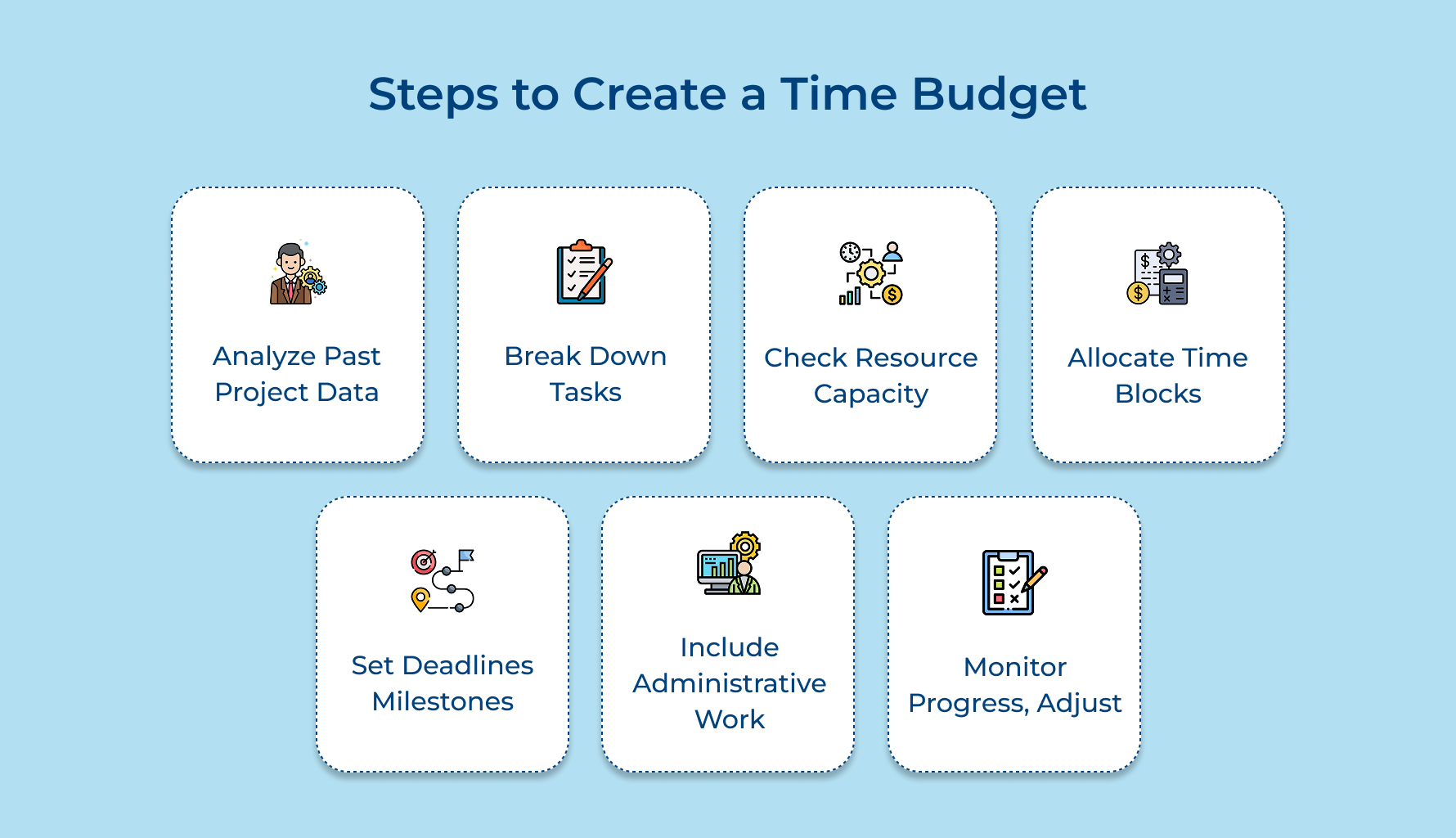
1. Analyze Historical Project Data
Building a smarter time budget starts by digging into past projects. Treat it like detective work – search through old timelines, task logs and client feedback using your project management tool or even a time trackers archive.
Why bother? Because the gap between what you planned and what actually happened holds all the answers. You’ll often discover:
- Creative work takes 20–30% longer than expected
- Client feedback adds surprise revision cycles
- Technical phases require extra troubleshooting
Crunch the numbers. Calculate average time spent per phase. This turns guesswork into data-backed insights and helps build a time budget template you can reuse confidently.
2. Break Down Projects Into Tasks
Ever feel overwhelmed just looking at a new project? Break it down. Dividing big deliverables into small, manageable parts makes everything easier to estimate and track.
Start by chopping large tasks into bite-sized components. It’s way simpler to estimate 3 hours for “create homepage wireframe” than for “design website.” Use a time budget template to list all these micro-tasks.
Then, build a work breakdown structure, a visual map showing how every small task connects to your final goal. Once mapped, assign estimates to each task based on who’s doing what. Someone experienced might fly through a job that takes others twice as long.
3. Identify Resource Availability and Capacity
The perfect plan on paper falls apart fast if you don’t have the right people or enough hours to get it done. That’s where resource capacity planning comes in.
Start by asking:
- Who has the right skills for each task?
- Are they taking any time off soon?
- What does their daily workload really look like?
- Are they juggling other projects or even household chores that affect their work-from-home productivity?
Using a digital tool or a simple spreadsheet, map out each team member’s availability and commitments. This helps you assign work based on true capacity, so your priority tasks land with the right person and at the right time.
4. Allocate Time Blocks for Activities
Time blocking is where your plan becomes real. Instead of vague deadlines, you assign exact hours to tasks, meetings and reviews. It keeps projects from bleeding into extra time and gives every piece the attention it deserves.
Use time blocks for everything:
- Strategy sessions and client calls
- Deep-focus creative work
- QA and testing
- Admin work like invoicing
- Team brainstorms or sprint planning
Schedule your priority tasks during your team’s peak productivity hours. Group similar work together to reduce energy lost in context switching. Just don’t forget transition time, add 15-minute buffers to avoid back-to-back burnout.
5. Set Clear Deadlines and Milestones
Work tends to drift when there aren’t any deadlines. Set clear checkpoints that create structure, track progress and keep clients informed.
Here’s how to break it down:
- Start with the end goal – your final delivery date
- Plot weekly or bi-weekly milestones
- Build in buffers for reviews and unexpected hiccups
- Align dates with client schedules so expectations match
Imagine you’re working on a rebranding project. Set a final delivery for month three, with creative approvals and reviews scheduled every other Friday. This cadence ensures you’re never too far off track and gives your client peace of mind.
6. Account for Non-Billable Administrative Work
Time budgets often overlook a big factor: admin time. Tasks like planning, documentation, internal meetings or upskilling may not be billable, but they’re vital to keeping projects on track.
To prevent these from cutting into your billable hours:
- Schedule admin tasks during low-energy times, like late afternoons
- Batch similar items (emails, file cleanup, follow-ups) to stay in flow
- Use a digital tool to organize recurring internal tasks
It keeps your team focused and your time budget realistic. Because if you don’t plan for it, it’ll still happen and steal time from higher-priority work.
7. Monitor Progress and Adjust Time Budget Regularly
A time budget isn’t a one-and-done document, it should evolve with the project. Use time trackers to monitor hours spent and compare them with your estimates.
Track metrics like:
- Planned vs. actual hours per task
- Billable utilization by team member
- Progress percentage vs. timeline
- Budget variance trends
- Impact of client revisions
If you spot issues, ask: is this a one-time thing, or part of a pattern? Use this insight to refine your process and future time budget templates. Review your data weekly as well as recalibrate as needed. With each adjustment, your estimates get sharper and your planning stronger for the next round.
Top 6 Tips for Effective Time Budgeting
These practical strategies complement your core time budgeting process by addressing common challenges and optimization opportunities.
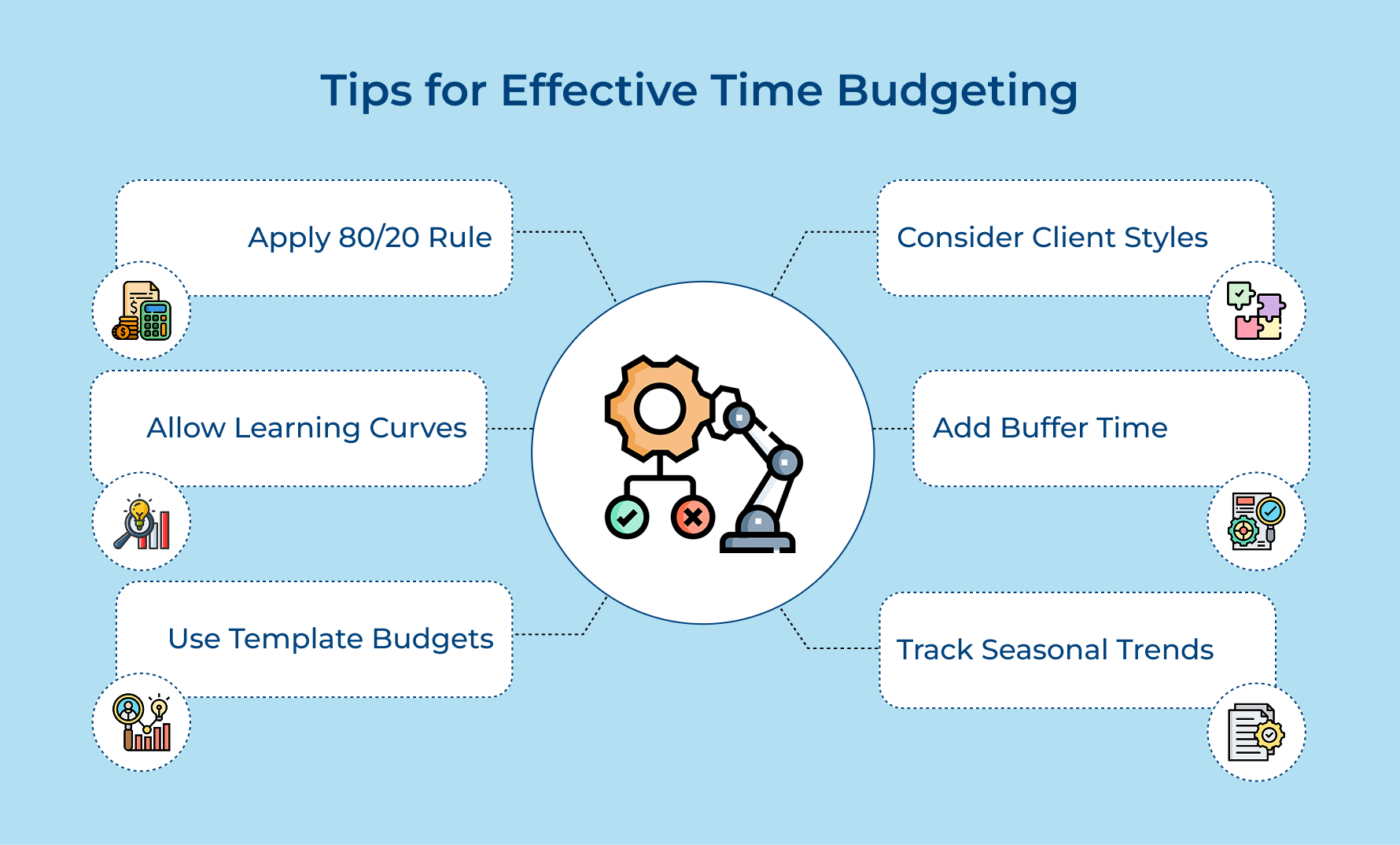
Use the 80/20 Rule for Task Prioritization
Focus your most detailed time planning on the 20% of activities that generate 80% of your project value and client satisfaction. This principle helps you avoid over-planning minor tasks while ensuring critical deliverables receive adequate time allocation and attention.
Build in Learning Curves for New Team Members
Always add 25-50% extra time when newer team members are handling unfamiliar tasks or working with clients they haven’t served before. The buffer accounts for the natural learning process and prevents project delays while team members develop competency.
Create Template Budgets for Recurring Project Types
Develop standardized time budgets for your most common project categories like brand identity or website development to streamline future planning. These templates serve as starting points that can be customized rather than building every budget from scratch.
Factor in Client Communication Styles
Different clients require varying levels of communication and approval processes so adjust your time budgets accordingly. High-touch clients may need twice as much communication time while self-directed clients might require minimal check-ins throughout the project lifecycle.
Schedule Buffer Time Before Major Deadlines
Always include 10-15% buffer time in the final week before important deliverables to account for last-minute revisions or unexpected complications. This safety net protects your reputation while reducing stress on your team during critical project phases.
Track Seasonal Variations in Productivity
Monitor how team productivity fluctuates during different times of year like holiday seasons or summer vacation periods. Use the historical data to adjust your time budgets and project scheduling to match realistic capacity expectations.
Why Time Budgeting Matters for Project Success
Time budgeting creates a structured framework that transforms how teams operate and deliver value to clients. These benefits directly impact both operational efficiency and bottom-line results.
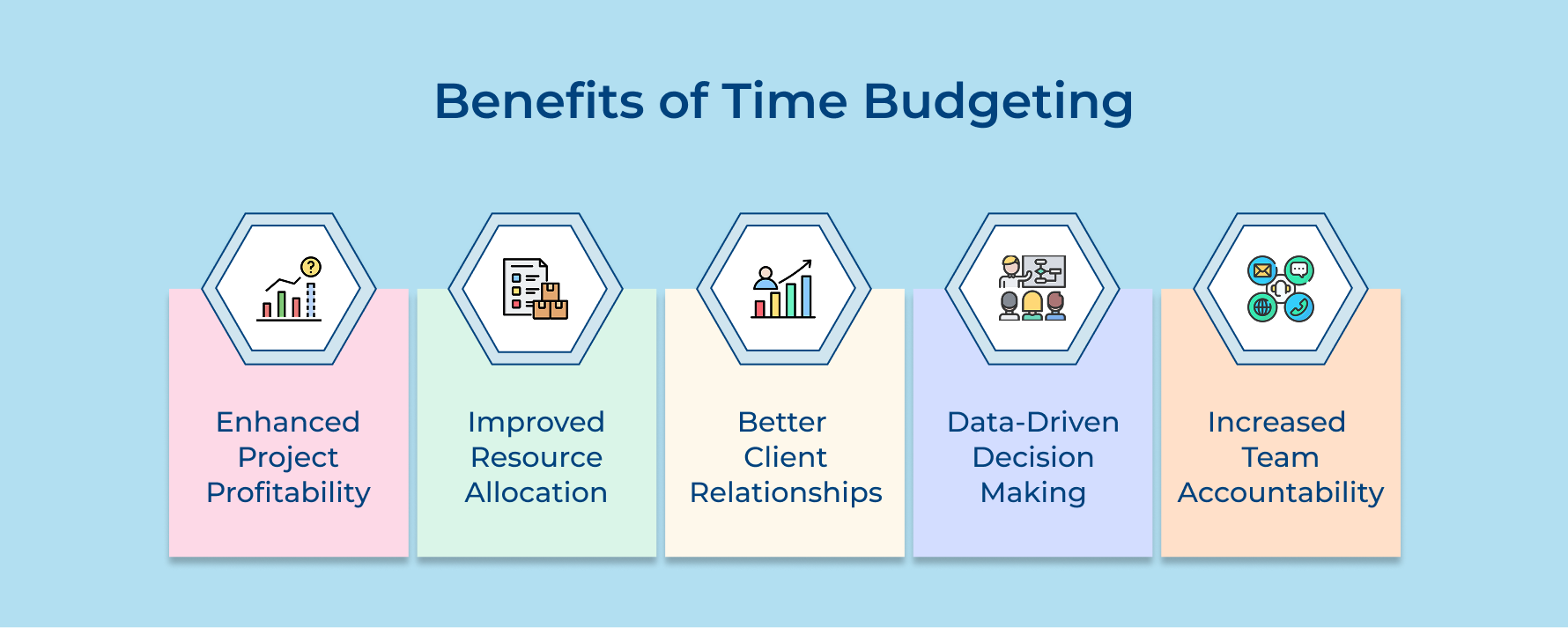
Enhanced Project Profitability
Time budgeting helps ensure every hour worked directly supports revenue goals. By reducing wasted effort and focusing on high-impact tasks, teams can price projects with confidence using solid estimates instead of guesswork.
Improved Resource Allocation
A structured time plan helps managers assign work more effectively. It’s easier to balance workloads, align skills to the right tasks and avoid situations where some team members are overwhelmed while others are underutilized.
Better Client Relationships
Delivering on time builds trust. Time budgeting supports realistic schedules and clear communication, so clients stay informed as well as confident throughout the project without sacrificing quality.
Data-Driven Decision Making
Tracking time across projects reveals useful trends. These insights inform future planning, allowing teams to refine their workflows and pricing strategies for better efficiency along with profitability.
Increased Team Accountability
A well-managed time budget gives visibility into individual contributions and overall progress. This clarity encourages team members to take ownership, driving a culture of responsibility and ongoing improvement.
Common Mistakes When Creating a Time Budget
Understanding these common pitfalls helps you recognize warning signs early and implement corrective measures before they derail your carefully planned schedules.
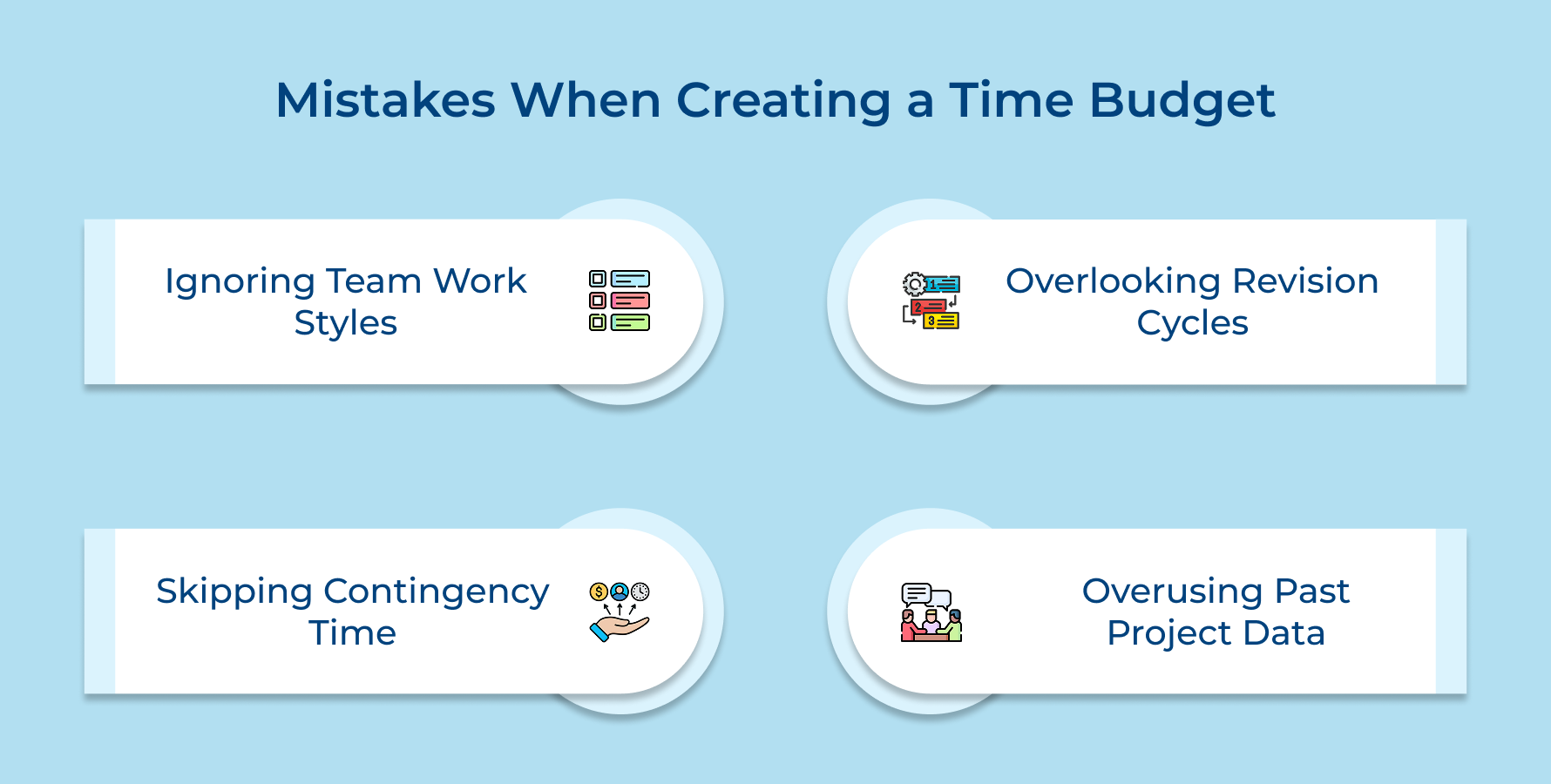
Ignoring Individual Team Member Working Styles
Assuming all team members work at the same pace leads to unrealistic expectations and stressed employees who cannot meet impossible deadlines. Some people need longer periods for deep work while others excel at quick iterative tasks requiring different time allocation approaches.
Failing to Account for Revision Cycles
First-draft thinking creates budgets that ignore the reality of client feedback and necessary revisions throughout the creative process. Most projects require multiple rounds of refinement and client approval which can double the time needed for final deliverable completion.
Not Building in Contingency Time
Perfect-world planning assumes nothing will go wrong and every task will proceed exactly as scheduled without delays or complications. Real projects involve sick days, technical difficulties and scope changes that require buffer time to maintain deadline commitments.
Relying Too Heavily on Past Project Data
Historical data provides valuable insights but applying old timelines to new projects without considering unique variables creates inaccurate estimates. Different clients and project scopes as well as team compositions require customized time budgets rather than copy-paste approaches from previous work.
Here are practical solutions that address each mistake while improving your overall planning accuracy and project success rates.
- Add 25-30% buffer time specifically for administrative tasks and client communication activities throughout your project timeline.
- Create individual productivity profiles for each team member based on their working style and adjust time allocations accordingly.
- Plan for at least two revision cycles in your initial budget and include client feedback processing time between rounds.
- Build 15-20% contingency time into every project phase to handle unexpected delays and scope adjustments gracefully.
- Customize historical data by adjusting for client complexity and project uniqueness rather than using templates without modification.
Management Projects Efficiently with Strategic Time Budgeting Process
Strategic time budgeting transforms chaotic project workflows into predictable revenue-generating systems that consistently deliver client satisfaction. Think of this process as building a foundation where every hour invested contributes meaningfully to both immediate project success and long-term business growth.
Implementing these systematic approaches creates sustainable competitive advantages through improved resource allocation and enhanced team productivity. Remember that effective time budgeting requires continuous refinement based on actual performance data rather than remaining static throughout your business evolution.
Limit time — not creativity
Everything you need for customer support, marketing & sales.

Pooja Deshpande is a content contributor at Kooper, focused on creating insightful resources that help agencies and service providers scale efficiently. Passionate about SaaS trends, content strategy, and operational excellence, she delivers practical, easy-to-implement guidance for modern business leaders.